“All data is encrypted at rest with HSM-backed keys” is a sentence that shows up in security questionnaires and audit responses, and it is rarely true as written. In one Azure estate we evidenced, fewer than half the managed disks, and none of the storage accounts or backup vaults, used HSM-backed customer-managed keys, while all of that data was still encrypted at rest with AES-256. The gap is not in the encryption; it is in the claim, and an auditor who tests the claim will find it.
The client is a professional-services firm whose security questionnaire asked whether data at rest was protected with HSM-backed encryption. We built the evidence pack from the Azure Resource Manager API and portal captures taken on the same day. What follows explains what the phrase means, what it does not, and how to state coverage in a way that survives review.
Encryption is always on; key custody is the choice
Azure managed disks and storage accounts are encrypted at rest by default with server-side encryption (SSE). Microsoft documents it as 256-bit AES and FIPS 140-2 compliant, and for storage accounts it cannot be disabled. Nobody has to switch it on. Two footnotes from the same documentation: disks with encryption at host are encrypted on the VM host instead, still at rest, and a VM’s temporary disk is not a managed disk, so SSE does not cover it unless encryption at host is enabled (newer VM sizes encrypt it automatically).
What you choose is who manages the key:
- Platform-managed keys (PMK). Microsoft creates, stores and rotates the keys. This is the default.
- Customer-managed keys (CMK). Your key, held in Azure Key Vault or Managed HSM, wraps the data encryption key that actually encrypts the data. Azure calls this envelope encryption. You can rotate the key, audit its use, and revoke it. Revoking it makes the data unreadable, and Microsoft documents that VMs whose disks depend on a disabled key shut down.
“HSM-backed” sits on top of the second option. It means the customer-managed key lives in a hardware security module rather than in software. It describes key custody, not the encryption algorithm. A disk on a platform-managed key and a disk on an HSM-backed customer key are both encrypted with AES-256. The difference is who controls the key that protects the data key, and what hardware that key lives in.
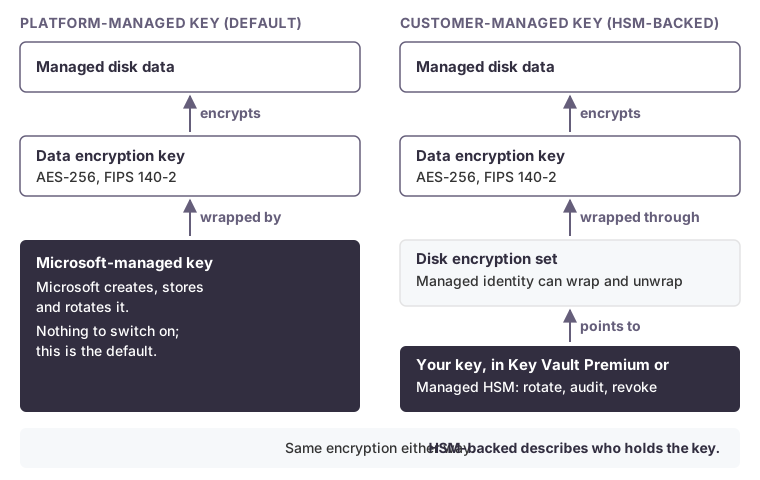 The encryption is identical. Only custody of the key that wraps the data key changes.
That distinction matters in both directions. It means a “no” on HSM coverage is not a finding that data is unencrypted. It also means “encrypted at rest” cannot be quietly upgraded to “HSM-backed” in a questionnaire.
How managed disks get a customer key
For managed disks, the link between a disk and your key is a disk encryption set. That is a resource that points to a key in Key Vault or Managed HSM and holds a managed identity with permission to wrap and unwrap with that key. A disk uses a customer key only if it is associated with a disk encryption set. Creating the key, or even the encryption set, changes nothing for disks that are not associated with it.
Per Microsoft’s documentation, as of October 2026, managed disks support RSA keys of 2,048, 3,072 or 4,096 bits, software or HSM-protected, and HSM keys in a vault require the Premium tier.
Which HSM, at which level
“HSM-backed” also hides a question auditors increasingly ask: validated to what level? According to Microsoft Learn, as of October 2026:
| Key location | FIPS validation |
|---|---|
| Key Vault (Standard or Premium), software-protected keys | FIPS 140-2 Level 1 |
| Key Vault Premium, HSM-protected keys, HSM Platform 1 | FIPS 140-2 Level 2 |
| Key Vault Premium, HSM-protected keys, HSM Platform 2 | FIPS 140-3 Level 3 |
| Managed HSM (single-tenant) | FIPS 140-3 Level 3 |
Microsoft states that HSM Platform 2 now protects all new keys and key versions in Premium vaults. Older key versions may sit on Platform 1. Each key version exposes an hsmPlatform attribute, so check it per key version rather than assuming. Managed HSM adds single-tenant isolation and its own access-control model. Whether you need it is a requirements question, not a default.
State coverage per resource type
Here is what the evidence showed in this estate:
| Resource type | Customer-managed (HSM-backed) | Platform-managed |
|---|---|---|
| Managed disks | 196 of 447 | 251 of 447 |
| Storage accounts | 0 of 8 | 8 of 8 |
| Recovery Services (backup) vaults | 0 of 6 | 6 of 6 |
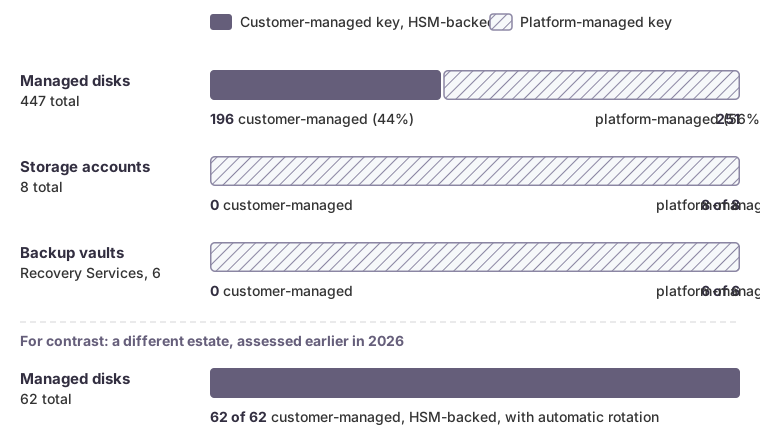 Coverage per resource type in this estate, with the earlier estate’s disks for contrast.
The disks that did use customer keys used RSA-HSM 2048-bit keys in a Premium vault with soft delete and purge protection on. So the accurate statement was: “All data at rest is encrypted with AES-256. Customer-managed, HSM-backed keys protect 196 of 447 managed disks; storage accounts and backup vaults use platform-managed keys.” That is a weaker sentence than the questionnaire hoped for, and the one that holds up.
Several other conditions belong in the same pack, because a reviewer will find them anyway:
- Keys that exist but protect nothing. The vault held keys named for storage and backup encryption that no resource referenced. A key in a vault is not coverage.
- Rotation. Automatic rotation was disabled on the production disk encryption set. Microsoft recommends enabling it, and Microsoft documents that disks move to the new key version within an hour, without a VM reboot.
- Key size. RSA-2048 is supported. Whether it meets the policy’s minimum is for the reviewer to confirm, not us to assume.
- Databases inside VMs. The SQL Server databases ran on VMs, so disk encryption covers their files, but transparent data encryption inside the engine needs an in-guest query and was reported as not verified.
Backup vaults deserve a specific warning. Microsoft documents that customer-managed keys can be enabled on a Recovery Services vault only before any item has been protected, or even attempted. A vault already in use cannot be converted. Closing that gap means new vaults and a migration plan, not a setting change.
For contrast, in a different client’s estate we assessed earlier in 2026, all 62 of 62 managed disks were on HSM-backed customer keys, with automatic rotation enabled. That estate could make the disk claim without qualification. The point is not that one estate is good and the other is not. Each claim has to be stated, and measured, for the estate it describes.
Produce the evidence from the control plane
Screenshots help a reviewer orient, but counts should come from a query anyone can rerun. Azure Resource Graph returns encryption state across the subscriptions you can read:
resources
| where type =~ 'microsoft.compute/disks'
| extend encryptionType = tostring(properties.encryption.type)
| summarize disks = count() by encryptionType
The result splits disks by EncryptionAtRestWithPlatformKey, EncryptionAtRestWithCustomerKey and the double-encryption variant. Run the equivalent check for storage accounts, where properties.encryption.keySource reads Microsoft.Storage for platform keys or Microsoft.Keyvault for customer keys, and for each vault’s encryption settings. Then confirm key type, size, rotation and HSM platform with a direct read of each disk encryption set and key. Resource Graph can lag recent changes by minutes, so record the date and spot-check a few resources against the API.
How we can help
We build encryption-at-rest evidence packs that state coverage per resource type, from queries an auditor can rerun. If you need to answer an “HSM-backed” question accurately, or close the gaps behind it, talk to us.