Transferring a repository to another GitHub organization looks like a single button, and for history, issues and pull requests it is. What breaks is everything outside the repository that refers to it by owner and name: cloud logins, tokens, infrastructure code and deployment controllers, and any one of them can stop deploys on transfer day. The fix is to find those references first and change them in the right order.
We are planning a move like this now, for two repositories, one with live CI/CD into several environments. The transfer has not happened yet, so this is the plan and its reasoning, not a finished result. It came from a read-only scan of the repository, which is the first step we would recommend to anyone.
What GitHub carries over, and what it does not
GitHub’s documentation says a transfer keeps git history, issues, pull requests and the wiki, keeps webhooks, secrets and deploy keys with the repository, and redirects the old URL. That makes the move feel safe.
It is less explicit about environments, variables and repository-level self-hosted runners, so inventory them and confirm each after the move. Some things cannot come along because they belong to the source organization: organization rulesets, organization secrets and variables, organization runners, and GitHub App installations. Every external trust relationship written in terms of the old owner also stops matching.
The hidden dependencies
| Dependency | Symptom after the move | Fix |
|---|---|---|
| OIDC federated credentials in your cloud | Every cloud login step in CI fails | Add credentials for the new subject before the move; remove old ones after verification |
| Access tokens owned by the old organization | Runner management, infrastructure applies and API calls fail | Replace with a GitHub App installed on the new organization |
| Terraform or OpenTofu GitHub provider with a hard-coded owner | Plan wants to create or replace environments, variables and secrets | Make the owner a variable; read the plan; reconcile state instead of replacing |
Argo CD repoURL pointing at the old path | Works through the redirect, until it doesn’t | Update repoURL and repository credentials explicitly |
| Hard-coded owner/repo in CI scripts and tests | Scripts call the API at the old path | Derive from GITHUB_REPOSITORY or one variable |
| Self-hosted runners | Jobs queue with no runner | Confirm after the move; re-register if they did not follow |
| Organization rulesets, secrets, variables and Apps | Protections and integrations silently absent | Inventory beforehand; re-create or re-install |
OIDC subjects: add first, remove last
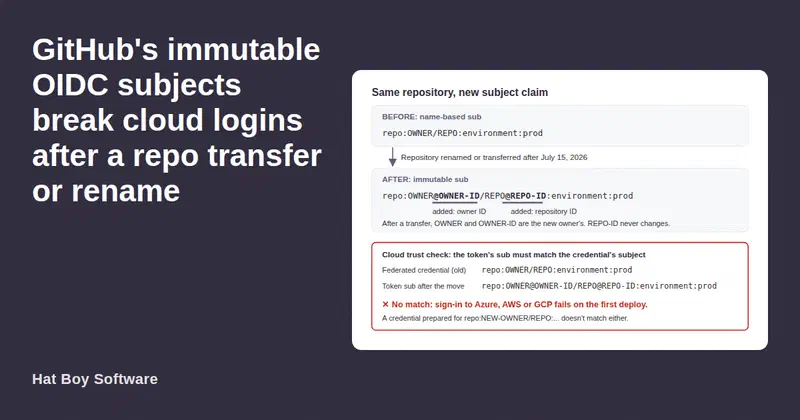
Workload identity federation lets GitHub Actions sign in to a cloud with no stored secret. But the cloud trusts a specific subject (sub) claim in the token GitHub issues, and that claim names the owner. Older repositories use a name-only form:
repo:<owner>/<repo>:environment:<env>
Since July 15, 2026, GitHub uses an immutable format for repositories that are created, renamed or transferred, adding numeric IDs: repo:<owner>@<owner-id>/<repo>@<repo-id>:environment:<env>. So a transfer now also switches the subject format, and a credential written for repo:<new-owner>/<repo>:... will not match.
The safe sequence is to add a federated credential for the exact subject the moved repository will present, in every environment, before the transfer. Build it from the new organization’s ID and the repository’s ID, and confirm it with a test repository rather than assuming. Once the moved repository has signed in everywhere, delete the old credentials. If identities live in infrastructure code, make the subject a variable.
Check every cloud: a second provider with its own federation fails the same way.
Tokens: replace them with a GitHub App
Workflows that manage runners, environments or secrets often use a token created in the old organization. After the move it either stops working or, worse, keeps working, leaving an old-organization credential, possibly with reach into its other repositories, inside the new one.
Create the replacement before the move. A GitHub App installed on the new organization beats a personal token: it is not tied to a person, its permissions can be limited to what the workflows use, and it can be installed on only the repositories that need it. Stage it as a new secret, switch over on the day, then revoke the old token.
Infrastructure code: read the plan before you trust it
If the repository manages its own GitHub settings with Terraform or OpenTofu, the provider’s owner is often a literal, set as owner or through the GITHUB_OWNER environment variable. Check both: the provider’s current documentation says GITHUB_OWNER takes precedence. Point it at an organization where the repository does not exist yet, and the provider cannot find the environments and secrets it manages and plans to create them.
Make the owner one variable. A plan with the new owner before the transfer will show these resources as missing, so treat it as a checklist, not a verdict. After the transfer, read every github_* change. Where the plan still wants to replace something that exists, reconcile state instead of applying:
# re-point state at the environment as it exists after the move
tofu state rm 'github_repository_environment.this["prd"]'
tofu import  'github_repository_environment.this["prd"]' '<repo>:prd'
The environment import ID is <repo>:<environment>; the provider supplies the owner. The goal is a drift run with no GitHub replacements.
Argo CD: don’t rely on the redirect
Argo CD will keep syncing from the old URL through the redirect. That is fragile for two reasons. The redirect is permanently deleted if anyone creates a repository with the old name at the old owner. And Argo CD picks credentials by URL (an exact match for a repository entry, the longest matching prefix for a credential template), so a credential set up for the new organization’s URL will not be used for an application still pointing at the old one. Update repoURL in each application, update the credential, and sync a non-production environment first.
Hand over artifacts, not source access
Sometimes a moved repository builds something from source owned by the old organization. Keeping that build leaves a credential to the old organization’s source inside the new one. The cleaner pattern is to hand over signed artifacts: the source signs images in CI with keyless cosign and grants a pull-only registry token with a deliberate expiry, and the receiver pulls by digest and verifies the signer before deploying:
cosign verify \
  --certificate-identity "https://github.com/<owner>/<repo>/.github/workflows/<sign>.yml@refs/heads/main" \
  --certificate-oidc-issuer "https://token.actions.githubusercontent.com" \
  <registry>/<image>@sha256:<digest>
Check the identity against a real signed image first; a small difference in workflow path or ref fails verification.
Transfer day and verification
The plan for the day: freeze merges and pause merge or review automation. Transfer, switch workflows to the new credential, set the owner variable, update Argo CD, re-create organization-level items, and confirm the runners. Then verify with real work: a trivial pull request runs CI green, a non-production deploy succeeds, an infrastructure drift run is clean, and the new organization holds no credential to anything it should not reach. Only then remove the old OIDC credentials and revoke the old token.
How we can help
We plan and run platform moves like this one, starting with a read-only scan for every place the platform names itself. See our services for how we scope platform reliability work.