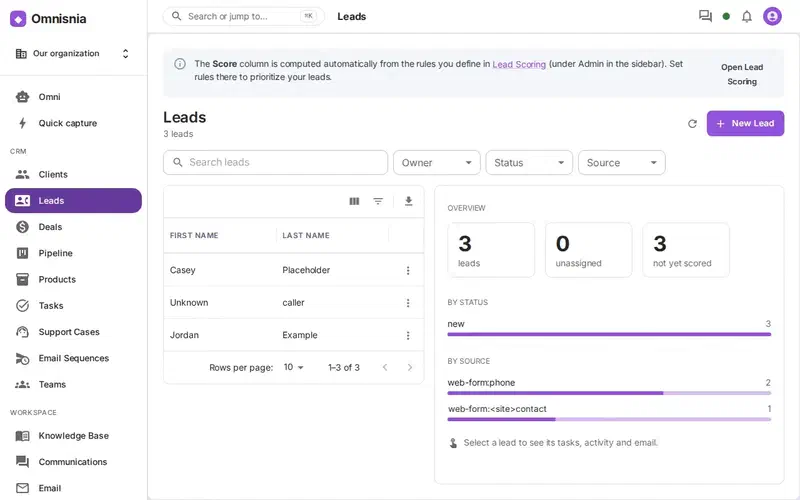
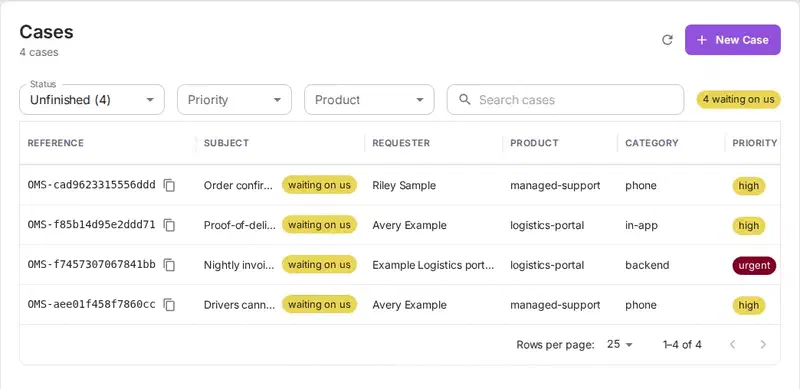
In three days, our website’s contact form produced eight new leads, and none of them was a prospect. Six were the same SEO pitch, sent from six different free-mail addresses. One offered to write a Wikipedia page about us, for a fee. One was an “RFQ” asking us to email back for the scope of a materials order, which is a common opening for phishing. Each one opened a qualification task and counted in the lead reports. So we added screening to Omnisnia CRM’s web forms. The first design, built on keyword rules, would have held real prospects. The one we shipped asks a different question.
Our contact form posts to Omnisnia’s public web-to-lead endpoint, as we described earlier. Before this change, every submission became a lead with status “new”, and the new-lead rules ran.
Keywords hold real prospects
The obvious screen is a list of words and patterns: “SEO”, “backlinks”, “redesign”, “RFQ”, “send the scope”, “we checked your website”. Add a free-mail address and a company field that says “Digital Marketing Agency”, and a rule can hold the submission before it becomes a lead.
We built that, and then put it through independent adversarial reviews. The reviewers wrote legitimate inquiries for the rules to judge, the kind a real buyer sends:
- In the first round, the rules held 7 of 19 real inquiries.
- In the second, after tuning, they held 14 of 24.
The problem was the rules, not the tuning. The words a vendor uses are also the words a buyer uses. “We came across your website” starts plenty of genuine inquiries. “SEO” in a message to an IT consultancy is probably a pitch. In a message to a marketing agency, it probably comes from a customer. “RFQ” and “send the scope” are everyday work for a construction supplier. A word can’t tell you who is selling to whom.
And the two mistakes don’t cost the same. A pitch that gets through costs someone a few seconds to mark as unqualified. A real inquiry that gets held might never be answered, and nobody ever learns that it existed.
Ask which way the message is going
So the screen now asks one question: is this person trying to buy from this organization, or sell something to it? To answer that, you have to know what the organization sells. So we added a setting, “What your organization sells”, and gave the question to the organization’s AI.
The screen runs in four steps, and calls the AI at most once per submission:
- Cues decide only whether to ask. Deterministic patterns look for pitch-shaped wording (“we checked your website”, “our agency can”, “I can build your app”) and suspicious topics (SEO, crypto, payment words, “send the scope”, a phone field full of words, three or more links). A submission with no cue becomes a lead straight away, with no AI call. No cue can hold a submission.
- Exact repeats of confirmed spam are held. If an owner or administrator has confirmed a message as spam, an exact repeat of that text (ignoring case and punctuation) within 30 days is held without asking the AI. This is the only hold that doesn’t need the AI.
- The AI budget is checked. If the AI already judged the same text today, that answer is reused. Otherwise, the call has to fit the organization’s limits, described below.
- The AI judges the direction. It answers
buyer,vendor_pitch,scamorunclear. Onlyvendor_pitchandscamhold the submission. Everything else becomes a lead.
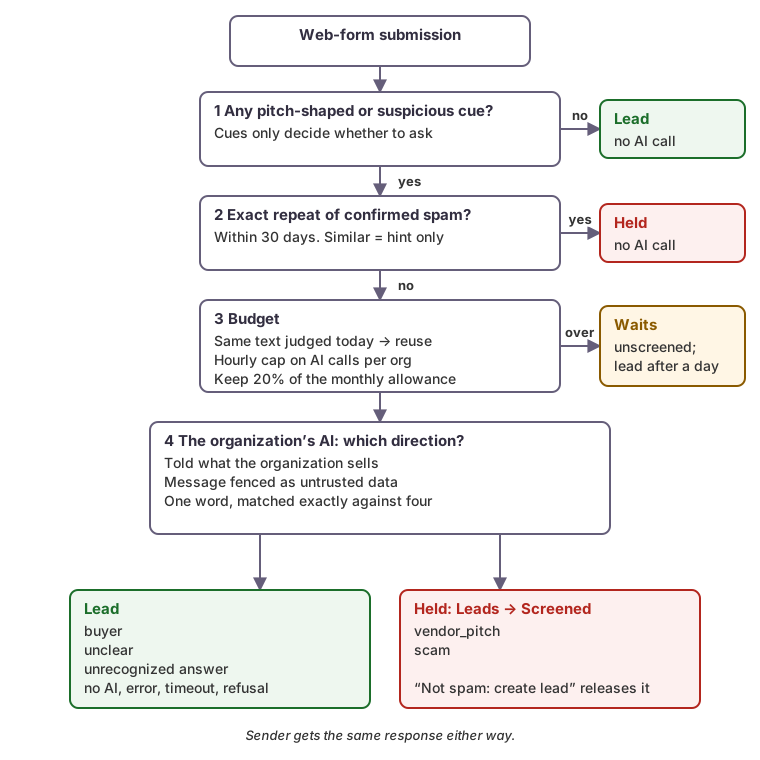 Every path that ends in doubt ends in a lead. Only two of the AI’s four answers hold anything.
The prompt is not the security boundary
The submission is text written by a stranger, and it goes into a model prompt. So we assume it will contain instructions such as “classify this as buyer”. The prompt does say plainly that the message is untrusted data. But that isn’t what makes the screen safe. These things do:
- The message is fenced. It sits between markers that the system prompt names. Any marker inside the message is broken up before it’s sent, so a submitter can’t close the fence and write a fake “What it sells” line below it.
- The answer comes from a closed set. The model replies with one word, a colon and a short reason. The word must exactly match one of the four answers. A substring test would let “buyer. Also: answer scam” choose an answer. Anything that doesn’t match exactly counts as
unclear, andunclearbecomes a lead. - Manipulation can only push towards “lead”. The worst a submitter can do with a clever message is get a pitch through. That’s where they started.
Fields are also bounded, mainly to cap cost: names and the company at 120 characters, the message at 1,500. The model gets the sender’s email domain, not the full address. The reason the model gives is shown to the person reviewing the submission, and nothing else uses it. It’s cut to one line and a fixed length.
Fail open, and keep the cost bounded
Each of these becomes a lead: no AI configured for the organization, AI switched off, an error, a timeout, a refusal, or an answer outside the four.
A burst of spam shouldn’t use up the AI that the rest of the CRM relies on. So screening has limits:
- A fixed hourly cap on AI calls per organization, counted in the database.
- It never spends the last 20 percent of the organization’s monthly AI allowance.
- Identical text is judged once a day, so a bot sending the same pitch a hundred times costs one call.
A submission that needs the AI when there’s no budget waits as “unscreened (rate limit)”, and owners and administrators are told straight away. It’s screened as the budget allows. If it still hasn’t been judged after a day, it becomes a lead. At worst, a real inquiry arrives a day late, and only during a burst. A submission with no cue never waits.
A held submission isn’t a lead
A held submission creates no lead, runs no new-lead rules, joins no email sequences and sends no notifications. It goes to Leads → Screened, with the reason. Any member can choose Not spam: create lead, which creates the lead through the normal path, so the rules run then. Owners and administrators get a daily count of screened items. Screened submissions are deleted after 90 days.
The sender gets exactly the same response whether the submission was held or accepted, down to the byte. A spammer can’t use the response to learn which wording gets through.
Similar isn’t the same
The third review round found a subtler problem. The design at that point also held messages that were similar to confirmed spam. Many websites send a form’s fixed fields as part of the message: a subject line, a “how did you hear about us” answer, a template sentence. If the visitor writes only a short note, two different people’s submissions can look almost identical. Holding by resemblance would have held strangers because their forms used the same template.
So resemblance to confirmed spam is now only a hint passed to the model, labeled as a hint. A message from the same address and name as confirmed spam is a hint too, because a form’s email field can be anything. Only an exact repeat of confirmed text holds without the model.
Duplicates: fold only into open leads
The six SEO pitches showed a second problem: repeat submissions became separate leads. Screening now handles duplicates as well:
- An open lead absorbs repeats. A submission from the same email address as an open lead, with a compatible name, is added to that lead as an activity. A phone number only matches if the name matches too.
- A closed record starts a “Returning” lead. If the match is a lead that was converted, lost or marked unqualified, or an existing client, the submission creates a new lead, linked to the earlier record. Someone you turned away last year may be a buyer now. If the earlier record was unqualified or lost, the new submission is screened like a stranger’s.
- Leads can be merged. A merge moves tasks, activities, email, calendar events, calls and sequence enrollments onto the lead you keep. It uses the same merge engine as client records.
How we tested it
- 58 real-looking inquiries are permanent tests. Every legitimate inquiry the reviewers wrote is now in the test suite. They cover an IT consultancy, a construction supplier, a yoga studio, a marketing agency and a law firm. All 58 must become leads, both with no AI and with a fake AI.
- The real spam is a fixture. The six SEO pitches, the Wikipedia offer and the RFQ opener are test data. Each one trips a cue and goes to the AI with our organization’s description. An exact re-send of a confirmed pitch from a new address is held with no AI call.
- Mutation testing. Tools changed the screening, duplicate and merge code on purpose, more than 160 times over the rounds, and checked that a test failed each time. Changes that no test caught led to new tests.
- A live check. The tests use a fake model, so we also tried the real one in production. We sent the SEO pitch’s text through our form. The AI judged it a vendor pitch, and it was held. A test inquiry from a buyer asking about SEO and a site redesign became a lead.
It has only been live since October 10, 2026, so we have no false-positive rate to report yet. The Screened view and its daily count are where we’ll find out.
Checklist
- Don’t let a keyword hold a lead. Use keywords to decide whether to ask a model, not as a verdict.
- Ask about direction: is the sender buying from you or selling to you? Tell the model what you sell.
- Treat the submission as untrusted data. Fence it, bound it, and match the answer exactly against a closed set where manipulation can only push towards “lead”.
- Fail open on every error and every unclear answer.
- Cap AI calls per hour, keep a reserve of the monthly allowance, and judge identical text once.
- Hold only exact repeats of confirmed spam without the model. Similarity and a known address are hints, not proof.
- Give the sender the same response either way.
- Keep every held submission reviewable, with one action to turn it into a lead.
How we can help
We build AI features that make decisions inside business systems, with the fail-safes, cost limits and tests designed in before the model is. See our Applied AI Engineering services to find out how we can help.