Say a founder with a small budget wants a first version of a mobile app: profiles, matching, real-time chat and push notifications. The fastest-looking answer is Firebase, because one console gives you a database, sign-in, push and server functions. We don’t recommend it as the backend for client builds. It isn’t a bad product. The problem is that leaving it later means rewriting how the app reads and writes data and migrating that data, and that is the kind of work we get hired to do in rescues. We start on Postgres instead, and we’re open about what that still ties you to.
An MVP that works will be extended, not thrown away, so the backend you pick on day one is usually the one you live with. Below is how we choose, the stack we recommend for a typical mobile MVP, and how we keep the exit cheap.
Why we don’t build client apps on Firebase
Firebase is a suite of Google services. Most Firebase MVPs are built on Cloud Firestore, and the parts an app like this depends on each carry their own ties:
- The data model. Cloud Firestore is, in Google’s words, “a NoSQL, document-oriented database”, and “unlike a SQL database, there are no tables or rows.” Data lives in documents grouped into collections, with subcollections and nested objects. The shape of your data follows the screens and queries you had when you designed it. Moving to a relational database means redesigning that shape, not just copying it.
- The query code. Unless you wrap it in a layer of your own, every screen that reads data uses the Firestore SDK and its query semantics. Leaving means rewriting each of those calls. A wrapper narrows the rewrite but doesn’t remove it, because the queries behind it are still document queries.
- The access rules. Firestore access control is written in Firebase Security Rules, which use a language based on Common Expression Language (CEL). Google’s documentation notes that because it’s a custom language, there’s a learning curve. Those rules don’t carry over anywhere; they have to be rewritten as database policies or API checks.
- Auth, push and functions. Sign-in, notifications and server functions are wired to the same project and the same cloud.
- The export. Firestore’s managed export writes files to a Cloud Storage bucket, needs a project with billing enabled (the Blaze plan), and can be loaded into BigQuery for selected collection groups (export and import docs). Google describes it as a way to recover from accidental deletion and to process data offline, not as a migration path to another database. Getting nested documents and subcollections into tables is a transformation project of its own.
None of that matters on day one. It matters when the app needs reporting that joins data across collections, a second cloud, or a team that wants SQL. At that point the cost is a rewrite of the data access layer plus a data migration, done while the app is live.
To be fair to Firebase, it now also offers SQL Connect (formerly Data Connect), backed by Cloud SQL for PostgreSQL. That puts the data in Postgres, but the API layer, auth and hosting are still Firebase’s, and it isn’t what most Firebase MVPs are built on.
Our default: Postgres as the system of record
We start client builds with Postgres as the system of record, because it’s the most portable choice available. Any host that runs Postgres can run your database, and pg_dump gets the data out in a standard format any Postgres host can load. Which layer sits on top depends on the size of the build.
For budget builds, Supabase. Supabase is Postgres with auth, a generated API, real-time and file storage on top. Its architecture page lists the open-source parts: Postgres; GoTrue for auth (MIT); PostgREST, which turns the database into a REST API (MIT); Realtime (Apache 2.0); the Storage API (Apache 2.0); and Deno for Edge Functions (MIT). It states the aim directly: “To avoid lock-in, we make it easy to migrate in and out,” relying on standards such as pg_dump and CSV. You can also self-host it with Docker. Self-hosting is community-supported, and some managed features, such as managed backups and point-in-time recovery, aren’t included. For most MVPs, the hosted service is the right call. Self-hosting is the fallback that keeps the hosted service honest.
For larger builds, a custom API over Postgres. When the product has real business rules, integrations or geospatial queries, we put our own API in containers in front of Postgres (with PostGIS where location matters). The API is ordinary code in a container, and the database is ordinary Postgres, so either one can move to another host.
What you would have to rewrite to leave
The useful question is not “is there lock-in?” but “what would we have to rewrite to leave?”
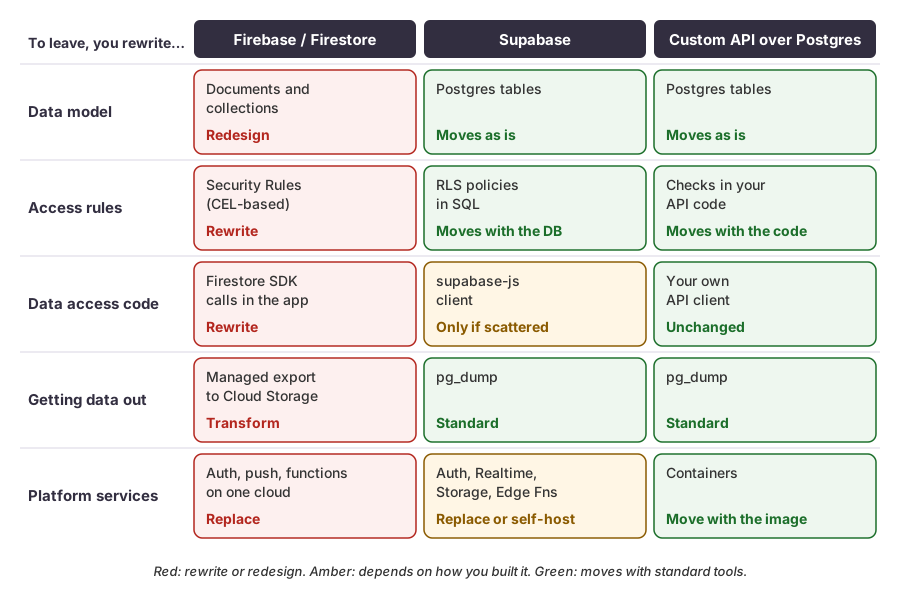 Each red cell is work you would pay for on the way out. The custom API costs the most to build and the least to leave.
Supabase is not lock-in-free
Postgres underneath doesn’t make everything above it portable. The parts that still tie you:
- Supabase Auth. Users are stored in the Auth schema of your database, managed by Supabase’s auth service. The rows come with you in
pg_dump, but the sign-in flows, tokens and theauth.uid()calls in your policies assume that service is running. - Realtime. Chat and live updates built on Realtime channels use Supabase’s protocol and client.
- Storage. Files sit behind Supabase’s Storage API, with access policies of their own.
- Edge Functions. These run on Supabase’s Deno-based runtime.
Each of these is open source and can be self-hosted, so the worst case is running them yourself, not rewriting them. To keep the exit cheap:
- Put business logic in the database or your own API, as Postgres functions or server code, not in client screens.
- Keep row-level security (RLS) policies in migrations in git, not only in the dashboard.
- Wrap the client in a thin data-access layer. Screens call
getMatches()orsendMessage(). Only that layer importssupabase-js. - Keep your own profiles table for app data, linked to the auth user’s ID, so the auth service can be swapped without touching the rest of the schema.
Postgres alone is not safety
Portability is not security. In what we find in apps built fast, missing or over-broad RLS is one of the most common failures. On Supabase, the browser or phone often talks to the database directly with a public key, and RLS is the only thing deciding which rows each user can reach. An app with profiles, matching and chat holds exactly the data that must not leak: private profiles, who matched with whom, and chat history.
So the RLS policies get the same treatment as the schema. They live in migrations and are reviewed, and a test signs in as one user and tries to read another user’s matches and messages. The correct result is zero rows.
The stack we recommend for a profiles-and-chat MVP
For a mobile MVP with profiles, matching, chat and push on a small budget, our default is:
- Expo (React Native) for one codebase on iOS and Android.
- Supabase for Postgres, auth, storage and RLS.
- Expo push notifications. Expo’s service handles the work of talking to Firebase Cloud Messaging and Apple’s push service, so both platforms are handled the same way. Expo’s FAQ says there is no cost for sending through it, and you can get the native device token and send directly through FCM and APNs if you ever need to leave. Android push still runs on Firebase Cloud Messaging, so the app needs a Firebase project for FCM credentials. That is a small, replaceable delivery dependency, not the backend.
- Chat on Supabase Realtime, or a hosted chat service if the product needs typing indicators, read receipts and moderation tools sooner than we would build them.
We also split the work into two phases, because the stores have requirements that a demo doesn’t.
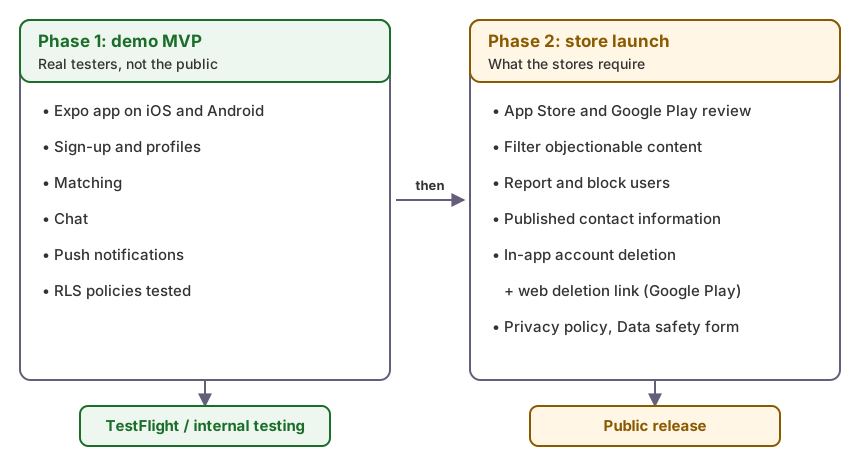 Phase 1 proves the product with real testers. Phase 2 is what the stores require before the public can download it.
Phase 1: demo MVP. The app runs on real phones through TestFlight and Google Play internal testing. Testers can sign up, build a profile, match, chat and get notifications. RLS is in place and tested from the start, because it is much harder to add later.
Phase 2: production store launch. This is where the store rules apply:
- User-generated content. Apple’s guideline 1.2 requires apps with user content to have a way to filter objectionable material, a way to report offensive content with timely responses, the ability to block abusive users, and published contact information. Profiles and chat count.
- Account deletion on iOS. Guideline 5.1.1(v): “If your app supports account creation, you must also offer account deletion within the app.”
- Account deletion on Android. Google Play requires an in-app path to delete the account and associated data, a web link where users can request deletion, deletion of the user data tied to the account, and answers to the data deletion questions in the Data safety form.
- A privacy policy that matches what the app actually collects.
Splitting the work this way puts the product in testers’ hands sooner and makes it clear that moderation, reporting and deletion are launch scope, not polish.
Checklist for choosing an MVP backend
- Ask what you would have to rewrite to leave, for data, rules, data access code, auth, push and files.
- Make Postgres the system of record unless you have a specific reason not to.
- Keep schema and RLS policies in migrations in git.
- Put vendor SDK calls behind a thin data-access layer.
- Test RLS by signing in as one user and trying to read another’s rows.
- Use push through a service that lets you export native device tokens.
- Plan moderation, reporting, blocking and account deletion as launch scope from the start.
How we can help
If your app is already built on a stack that is hard to leave, or you want a second opinion before you commit to one, our Stabilization Assessment reviews data access, RLS and deployment, and gives you a prioritized plan you can act on with us or another team.