When an AI assistant answers a question about your company, it works from whatever it can fetch and parse, and a marketing site full of navigation, scripts and layout is a poor source. An llms.txt file gives assistants a short, accurate Markdown summary of the site with links to the pages that matter. We generate ours, and a full-text companion, from the same Hugo content as the site, so they stay current with no extra work.
What llms.txt is, and what it isn’t
llms.txt is a proposal, published in September 2024, for a Markdown file at a site’s root that helps language models use the site. The format is small:
- An H1 with the name of the site. This is the only required part.
- A blockquote with a short summary.
- Optionally, more paragraphs or lists, but no headings.
- Zero or more H2 sections, each a list of links written
[name](url), optionally followed by a colon and a note. - By convention, a section named
Optionalholds secondary links that an assistant can skip when it needs a shorter context.
Be clear about its status. It is a community proposal, not a standard, and you can’t count on any assistant fetching it on its own. Google’s guide to generative AI features in Search (updated July 2026) says Search doesn’t use these files: they neither help nor hurt rankings, though keeping one for other systems is fine. If you are hoping for search traffic, this won’t bring it.
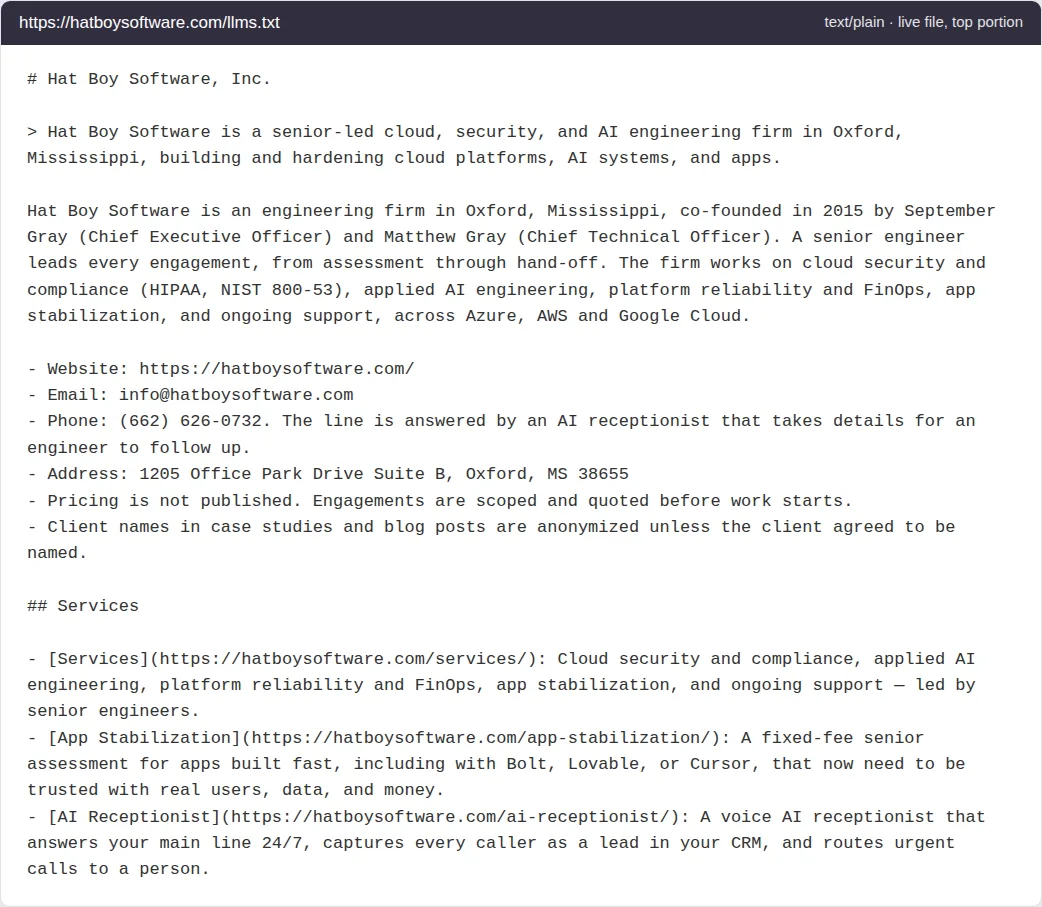
The top of our live llms.txt, served as text/plain and shown in a simple viewer for legibility, with the company name, founders, contact details, address and domain replaced by placeholders.
We built it anyway, for three reasons.
- It is cheap. Two templates, a partial and a few lines of configuration.
- It is accurate. It is built from the same content and parameters as the HTML, so it can’t drift from the site.
- It is useful today without any crawler support. Anyone can paste the URL into an assistant, or give it to an agent with a fetch tool, and get a clean description of who we are and what we publish.
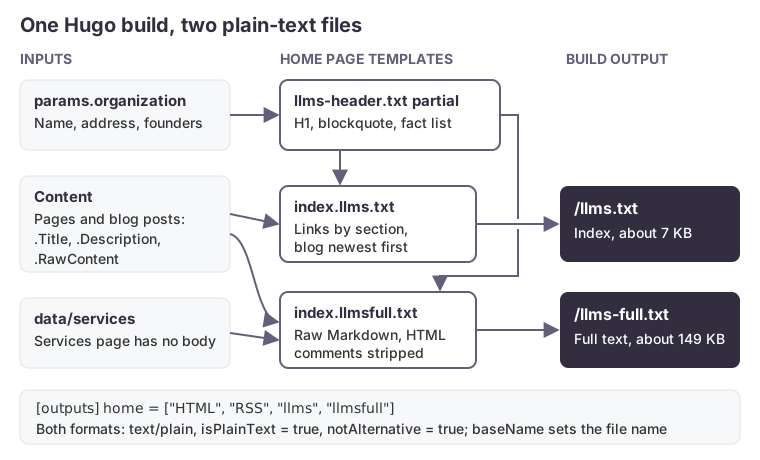
llms-full.txt isn’t part of the proposal. It is a common companion: the full text of the main pages in one file. Ours is about 149 KB, against about 7 KB for the index, which suits a tool that wants everything in one fetch.
Two custom output formats
Hugo can render the home page in several output formats. We define two plain-text formats and add them to the home page’s outputs:
[outputFormats]
  [outputFormats.llms]
    mediaType = "text/plain"
    baseName = "llms"
    isPlainText = true
    notAlternative = true
  [outputFormats.llmsfull]
    mediaType = "text/plain"
    baseName = "llms-full"
    isPlainText = true
    notAlternative = true

[outputs]
  home = ["HTML", "RSS", "llms", "llmsfull"]
baseName sets the file name, and the text/plain media type gives it the .txt suffix, so the build writes /llms.txt and /llms-full.txt. notAlternative keeps them out of .AlternativeOutputFormats, which themes use to emit alternate links in page heads.
isPlainText = true matters more than it looks. Without it, Hugo renders the template with Go’s HTML template engine, which escapes content for HTML contexts. Ampersands, quotes and angle brackets in titles and descriptions then come out as entities in what should be plain Markdown.
Templates and a shared header
Hugo finds a home page template for an output format by name: layouts/index.<format>.txt. Ours are index.llms.txt and index.llmsfull.txt. Both start with a partial, llms-header.txt, that renders the H1, the blockquote and a short fact list from site parameters, so the company name, address and summary come from one place.
The index lists pages by section. Blog posts sort newest first, each with its description as the note:
## Blog
{{ range (where site.RegularPages "Section" "blog").ByDate.Reverse }}
- [{{ .Title }}]({{ .Permalink }}): {{ .Description }}
{{- end }}

## Optional

- [Full text of this site]({{ "llms-full.txt" | absURL }}): The pages above as Markdown, in one file.
Writing descriptions for people, not for search snippets, pays off twice here: they become the notes an assistant reads.
Gotchas we hit
No strings.TrimSpace in older Hugo. Our build was pinned to Hugo 0.105 when we wrote this, and 0.105 doesn’t have it; the template fails to build. The workaround, which works on any version, is trim with an explicit cutset:
{{ trim .Description " \n\t" }}
The argument order is awkward. trim takes the string first and the cutset second, and a pipe passes its value as the last argument. So {{ .Description | trim " \n\t" }} trims the cutset string by the description’s characters, the reverse of what you want. Call it directly, and wrap pipelines in parentheses.
Raw content carries HTML comments. For the full-text file we use .RawContent, the Markdown source, rather than rendered HTML. It still contains anything written as an HTML comment, including Hugo’s <!--more--> summary divider and any editorial notes. We strip them with a non-greedy, dot-matches-newline regular expression before trimming:
{{ trim (.RawContent | replaceRE `(?s)<!--.*?-->` "") " \n\t" }}
Some pages have no Markdown body. Our services page is built from a data file, so .RawContent is empty and the page would appear in the full-text file as a bare heading. We render it explicitly from the data instead:
{{ with site.Data.services }}
{{ trim .subtitle " \n\t" }}
{{ range .content }}
## {{ .name }}

{{ trim .text " \n\t" }}
{{ range .bullets }}
- {{ . }}{{ end }}
{{ end }}{{ end }}
If your theme builds any page from data/ or front matter alone, check it in the output. A page that looks complete in the browser can be empty to a template reading content.
Whitespace control. Go templates leave a blank line wherever an action sat on its own line. Use {{- and -}} where the output’s line breaks matter, and read the generated file rather than the template. Markdown is forgiving of extra blank lines, but list items separated by blank lines can render as a loose list.
Keep it honest
Two rules made the file worth having. First, generate it, don’t hand-write it: a hand-maintained summary goes stale the first time someone adds a page. Second, put in only what the site already says. Our header states plainly that pricing isn’t published and that client names are anonymized, because an assistant will repeat whatever the file tells it. Then check the output after the build, as you would any other page.
How we can help
We build AI features that run on accurate, maintained data, from site summaries like this one to agents and assistants that work with your own systems. If you want help making your content and services usable by AI tools, get in touch.