
Bringing an endpoint detection and response (EDR) agent under Terraform sounds like paperwork when the agent is already installed everywhere. It isn’t. If the install script runs against a live, tamper-protected agent, it can fail the deployment, and a green extension status can sit on a host that is not actually protected. Both failures are quiet, and both land on exactly the machines a security team assumes are covered.
The client is a professional-services firm running Windows and Linux virtual machines in Azure, with SentinelOne as its EDR platform. The agent was already running on every machine in scope; the goal was to declare it in Terraform for about two dozen VMs so the code matched reality. The install mechanism was an Azure Custom Script Extension (CSE) that downloads a PowerShell script and runs it once on the VM. What follows is the staged change we designed to make that safe, with pilots before any fleet-wide apply.
Why “just declare it” fails
The existing script performed no presence check. It found the installer and ran it with the site token, the credential a new agent uses to register with the management console.
Against a host that already runs the agent, that is the one operation the script cannot survive. In what we have observed, the installer cannot stop the running agent. With anti-tamper protection enabled, the registration step then prompts for the existing install’s anti-tamper passphrase, which an operations team deploying through Terraform does not hold, and should not. The extension lands in a failed state with a misleading error, and the Terraform run for that VM fails.
This was not theoretical. A script from the same lineage, in another estate we support, had hit exactly this failure on production machines, and the fixes made there became the basis for the guard below.
Make the script refuse to reinstall
Microsoft’s guidance for the Custom Script Extension is direct: write scripts that are idempotent, so running them more than once by accident changes nothing. For an EDR agent, idempotent means two checks, in order.
- Is the agent running? If so, log it and exit successfully. There is nothing to do.
- Is the agent present at all? If it is installed but not running, for example mid-initialization, mid-self-upgrade or briefly stopped, refuse to install, log a loud warning, and still exit successfully.
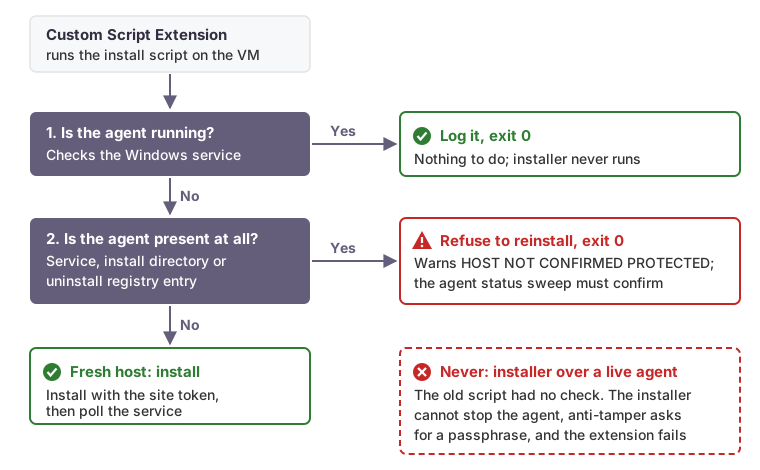
“Present” and “running” are separate questions, and treating them as one is how the damaging path opens. A strict “is it running?” check can legitimately return false on a host that has the agent. In the sister estate, on a host whose agent was healthy, the status call returned nothing usable from inside the extension’s execution context. Falling through to the installer in that state is precisely what triggers the anti-tamper failure.
$svc = Get-Service -Name 'SentinelAgent' -ErrorAction SilentlyContinue
if ($svc -and $svc.Status -eq 'Running') {
    Write-Host 'Agent installed and running; nothing to do.'
    exit 0
}
if ($svc -or (Test-Path '<agent-install-dir>')) {
    Write-Warning 'Agent present but not running. Refusing to reinstall. HOST NOT CONFIRMED PROTECTED.'
    exit 0
}
# Fresh host: install with the site token, then poll the service for several minutes.
The real guard checks a third signal, the Windows uninstall registry entries, so that any one of three independent signs is enough to say “present”.
Check the service, not the CLI output
Asking the agent’s own command-line tool is the obvious check, and parsing its output is fragile. In the sister estate, a Linux presence check inverted itself for about two months because of a shell interaction, a SIGPIPE combined with pipefail. The check reported “not installed” on hosts that had the agent, so the short-circuit never fired and each rerun tried to install over a live agent, which is how it eventually surfaced as failed extensions.
Windows has equivalent traps. The agent’s status text is not pinned across versions, and in Windows PowerShell with $ErrorActionPreference = 'Stop', redirecting a native tool’s stderr can turn harmless output into a terminating error. The guard therefore anchors on the agent’s Windows service, the same signal the client’s estate-wide agent sweep reports already used. The CLI is still called, with a hard time limit, but only to capture diagnostics for the log. It never decides anything.
Be honest about what “green” means
The “present but not running” branch exits 0 on purpose, so the extension reports success on a host that is not currently confirmed protected. That is the price of never reinstalling over a live agent. Separately, a service reaching Running does not prove the agent registered with the console, so a revoked or wrong-site token still produces a green extension.
The consequence is that extension status cannot prove coverage. The change therefore ends with an estate-wide agent status sweep, compared against a baseline taken before the change, and every genuine new install has to be confirmed in the console itself. Whether a registration failure should fail the extension is a separate decision with fleet-wide consequences, so it is its own follow-on change.
Get the token out of the repository
The same review found site tokens in plaintext in source control, one as a hardcoded fallback in the rendered script and one in a manual install note. Anyone with read access to the repository, or to the storage account the rendered script was uploaded to, held a working registration credential. Deleting the line is not enough, because git history keeps it. The first step of the change is rotating the token in the management console, before any code moves.
After rotation, the token path became:
- a sensitive workspace variable in Terraform Cloud, with no default, so a plan fails fast if it is missing;
- a Key Vault secret managed by Terraform, for anyone who needs to read it with an explicit role;
protected_settingson the extension, which Microsoft documents as encrypted with a key known only to Azure and the VM, and decrypted on the VM.
Be precise about what that buys you. Terraform’s documentation is explicit that marking a value sensitive only redacts it from output. It is still stored in state and plan files, so every workspace that creates the extension holds a copy in its state. On the VM, the token is still a command-line argument, which process-creation logging and the EDR itself may record. We wrote those residual exposures into the code alongside the token handling, so nobody calls the result “secret-free”.
The ignore_changes trap
The extension resources carried this lifecycle block:
resource "azurerm_virtual_machine_extension" "edr" {
  name                 = "edr-agent"
  virtual_machine_id   = var.vm_id
  publisher            = "Microsoft.Compute"
  type                 = "CustomScriptExtension"
  type_handler_version = "1.10"

  settings           = jsonencode({ fileUris = [var.script_url] })
  protected_settings = jsonencode({ commandToExecute = var.install_command })

  lifecycle {
    ignore_changes = [settings, protected_settings]
  }
}
Terraform considers ignored arguments when it plans a create, but ignores them when it plans an update. So a fixed script or a rotated token reaches newly created extensions, and never reaches the VMs whose extension already exists in state. The CSE adds its own layer, since it reruns only when its configuration changes.
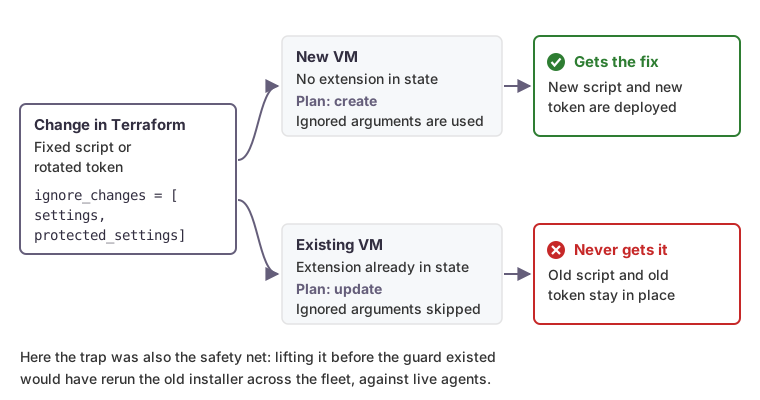
In the long run that is a bug. Here it was also the safety net. Lifting ignore_changes before the guard existed would have rerun the old installer across the fleet, against live agents. The order matters: ship the guard first, pilot it on one development VM that already runs the agent, confirm it exits without invoking the installer, then plan a follow-on change that replaces ignore_changes with a content hash so that future script fixes deploy deliberately.
How we can help
We bring security tooling under infrastructure-as-code without disturbing the agents already protecting production, and we document what each control does and does not prove. If your EDR coverage rests on extension status or a script nobody has rerun, talk to us.