Since July 15, 2026, renaming or transferring a repository on GitHub.com changes the subject claim in its GitHub Actions OIDC tokens to a format that adds numeric IDs. Any cloud trust that matches the old name-based subject stops matching, so every deploy that signs in to Azure, AWS or GCP fails the first time it runs after the move. The fix is cheap if you do it before the transfer: add trust for the new subject, verify it, and only then remove the old one.
Our earlier post on moving GitHub repositories covers the whole move: tokens, infrastructure code, Argo CD and the transfer-day order. This one goes deeper on the OIDC change, because it is the one most likely to stop deploys on the day. It covers why the format changed, how to build and confirm the exact new subject before you move, and how the change lands in AWS and Google Cloud as well as Azure.
What changed
GitHub Actions can request a short-lived OIDC token, and a cloud provider exchanges it for credentials with no stored secret. The cloud decides whether to trust the token mostly by its subject (sub) claim. The original default subject was built from names:
repo:<owner>/<repo>:ref:refs/heads/main
GitHub’s OIDC reference and its April 2026 changelog describe an immutable format that appends the numeric owner and repository IDs:
repo:<owner>@<owner-id>/<repo>@<repo-id>:ref:refs/heads/main
The rollout rules, as documented:
- Repositories created after July 15, 2026 use the immutable format by default.
- Repositories created before then keep the old format unless someone opts in, through the repository or organization OIDC settings or the REST API.
- Repositories renamed or transferred after July 15, 2026 move to the immutable format.
- Immutable subjects are not available on GitHub Enterprise Server. The change applies to GitHub.com only.
The third rule is the one that surprises people. A transfer used to change only the owner segment of the subject. Now it changes the owner segment and the format at once, so a credential you prepared for repo:<new-owner>/<repo>:... won’t match either.
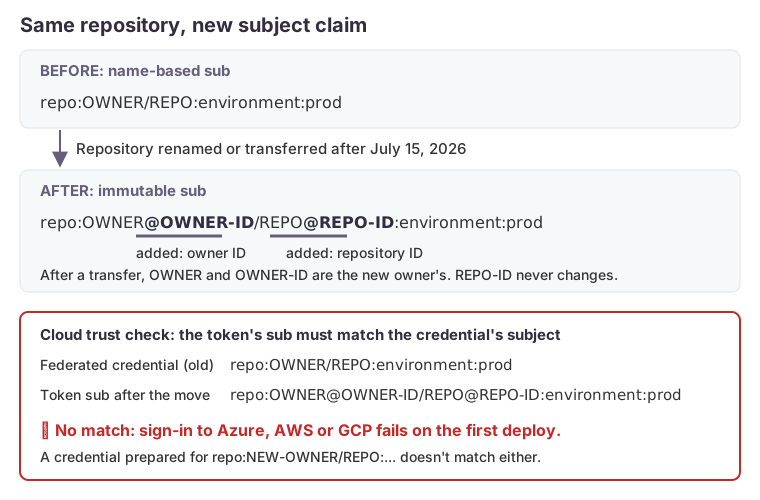
Placeholders only. After a transfer, OWNER and OWNER-ID belong to the new owner; REPO-ID stays the same.
Why the new format is more secure
Names can be reused. If an organization renames itself or deletes a repository, someone else can later create an owner or repository with the old name. With a name-based subject, their workflows would mint tokens your cloud already trusts. GitHub’s changelog states the risk plainly: a new owner “could mint tokens with the same subject claim, potentially gaining unauthorized access.”
Owner and repository IDs are assigned once and never reused. Microsoft’s guide to migrating federated credentials to immutable subjects (updated July 2026) says renaming or transferring the repository doesn’t change them. A transfer does put the repository under a different owner, so the owner ID in the subject becomes the new owner’s. GitHub’s own OIDC reference doesn’t state the ID behavior directly, so read the repository ID before and after a move and confirm it. A trust policy that matches the immutable subject stays bound to the repository it was written for. The breakage on transfer is the price of closing that gap, and it is worth paying.
Build the new subject before the move
After a transfer, the subject contains the new owner’s name and ID and the repository’s existing ID. Both IDs can be looked up beforehand:
# owner ID of the destination organization (use users/<user> for a personal account)
gh api orgs/<new-org> --jq .id

# repository ID; it should be the same before and after the transfer
gh api repos/<owner>/<repo> --jq .id
Combine them with the rest of the subject your workflows present today. If jobs use GitHub environments, the suffix is environment:<env> instead of the branch ref. Build one subject for each branch or environment that signs in.
Confirm the actual claim, don’t assume it
Subjects are easy to get slightly wrong, and organizations sometimes customize the subject template. Before you rely on a string you built, check what GitHub actually issues.
Read the repository’s OIDC settings. The REST API’s subject customization endpoint reports whether the repository uses the default template, which claim keys a custom template includes, and whether immutable subjects are enabled:
gh api repos/<owner>/<repo>/actions/oidc/customization/sub \
  --jq '{use_default, include_claim_keys, use_immutable_subject}'
Decode a real token in a throwaway workflow. This prints only the subject and the two ID claims. The token is masked in the log and never printed. Run it in a test repository created under the destination organization: new repositories get the immutable format. It shows the exact shape the moved repository will present, with the test repository’s own name and ID in place of yours.
name: show-oidc-subject
on: workflow_dispatch
permissions:
  id-token: write
jobs:
  show:
    runs-on: ubuntu-latest
    steps:
      - run: |
          token=$(curl -s -H "Authorization: bearer $ACTIONS_ID_TOKEN_REQUEST_TOKEN" \
            "$ACTIONS_ID_TOKEN_REQUEST_URL&audience=api://AzureADTokenExchange" | jq -r .value)
          echo "::add-mask::$token"
          payload=$(echo "$token" | cut -d. -f2 | tr '_-' '/+')
          while [ $(( ${#payload} % 4 )) -ne 0 ]; do payload="$payload="; done
          echo "$payload" | base64 -d | jq '{sub, repository_id, repository_owner_id}'
Add first, remove last
The safe order is the one Microsoft documents for opting in, and the one our earlier post uses for the whole move. Add a trust for each immutable subject alongside the old one before the transfer; in Microsoft Entra ID that is a second federated credential on the same app registration or managed identity. Transfer, confirm that every workflow signs in, in every environment, and only then remove the old name-based trust.
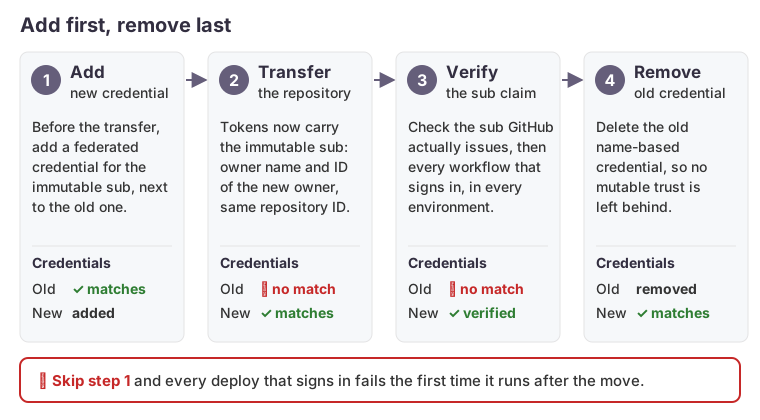
If federated credentials live in infrastructure code, make the subject a variable built from the owner, the IDs and the environment, so the change is one reviewed plan rather than edits by hand in the portal.
For flexible federated credentials, which match by expression rather than by exact subject, Microsoft’s guide notes they must also match repository_id, repository_owner_id or both. Matching on IDs states the trust boundary directly.
AWS and Google Cloud are affected too
This isn’t specific to Azure. Any trust that matches on sub breaks the same way, and wildcards don’t save you.
- AWS. IAM requires a role trusted by GitHub’s OIDC provider to test
token.actions.githubusercontent.com:sub, and the IAM documentation showsStringLikepatterns such asrepo:<org>/<repo>:*andrepo:<org>/*. Neither matchesrepo:<org>@<org-id>/<repo>@<repo-id>:..., because the@<id>sits right after the name. An organization-wide pattern breaks for every repository that is created, renamed or transferred after July 15, 2026, not only the one you moved. Add the new pattern before the move and remove the old one after. - Google Cloud. Workload Identity Federation for deployment pipelines maps
google.subject=assertion.sub. A principal binding to a specific subject, or an attribute condition that testsassertion.subor the repository name, needs the same add-then-remove treatment. Google capsgoogle.subjectat 127 characters, so check the length of the longer immutable subject when names are long. Google already recommends conditions onrepository_idandrepository_owner_idrather than names, and those claims don’t depend on the subject format.
Search every cloud account and every infrastructure repository for the old subject string. A second cloud with its own federation fails just as the first one does, and it is easy to forget the one that deploys rarely.
Opting in on your own schedule
Repositories that aren’t moving can opt in deliberately: add the immutable-subject trust, enable the setting, verify, and remove the old trust. That closes the name-reuse gap without waiting for a rename to force the issue, and it lets you choose when the change happens instead of finding out during a transfer.
How we can help
We plan and run repository and platform moves, starting with a read-only search for every place the platform names itself, including cloud trust policies. We then change them in an order that keeps deploys working throughout. See our services for how we scope this work.