Page views tell you which articles get read. They don’t tell you which ones bring in work. We wanted three things. Every lead from our contact form should say how that person found us and what they read. Each article should have a lead count, not just a view count. And none of it should use cookies. All three are now live, connecting share links, a small script in the browser tab, the contact form and Omnisnia CRM. The design choice that made the lead counts trustworthy was to count leads in the CRM, not in the analytics.
We already measure traffic with cookie-free Application Insights telemetry. This adds attribution on top of it.
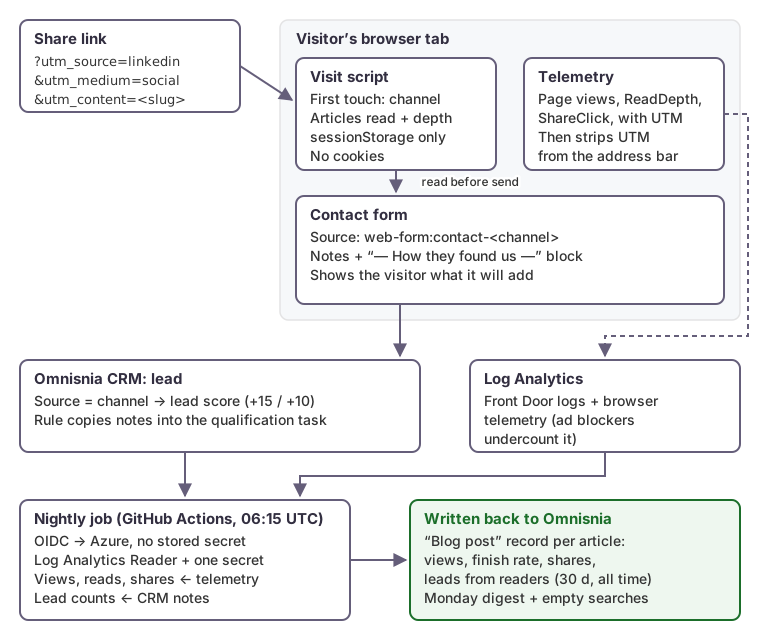 The lead path runs in the visitor’s browser and the CRM. The nightly job only adds totals.
Tag every link you share
Each post has a share bar for LinkedIn, X, Facebook, email and copy link. Every link it builds carries UTM tags:
| Parameter | Value |
|---|---|
utm_source | The channel: linkedin, x, facebook, email, newsletter or copy |
utm_medium | social, email or referral |
utm_campaign | blog |
utm_content | The post’s slug |
A script generates the same links as a spreadsheet, six per post, for anyone sharing a post by hand or in a newsletter.
When a tagged link brings someone in, the telemetry records the tags on the page view and on every later event on that page. Then it removes them from the address bar. Without that step, a reader who copies the URL from the address bar would pass their own LinkedIn tag on to whoever they send it to. The canonical URL never carries the tags.
Remember the visit in the tab, not in a cookie
A small script (about 150 lines) runs on every page. It keeps two things in the tab’s sessionStorage:
- The first touch. This is the UTM tags if there were any. Otherwise it’s the referring site, sorted into a channel. It recognizes search engines, social networks and AI assistants such as ChatGPT, Perplexity, Claude, Copilot and Gemini, so we can see if answers from AI assistants send us readers.
- The articles read, each with the furthest point the reader scrolled to: 25, 50, 75 or 100 percent.
It has to load before the telemetry script, which removes the UTM tags from the address bar.
sessionStorage is per tab and is cleared when the tab closes. Nothing is set as a cookie, and nothing follows the visitor to another site or another visit. That’s the privacy property we wanted, and it has a cost, which we come back to below.
Put the answer in the lead
When the visitor sends the contact form, it adds a block to their message:
— How they found us —
Arrived from: LinkedIn (social · campaign: blog), on 2026-10-10
First page: Two SQL Server incidents where nothing crashed (/blog/sql-down-but-never-crashed/)
Articles read: Two SQL Server incidents where nothing crashed (finished); Your load balancer health probe may be lying (75%)
Pages visited this session: 3
The form also sets the lead’s Source to the channel, such as web-form:contact-linkedin or web-form:contact-google, so leads can be filtered and reported by channel. A rule in Omnisnia that opens a qualification task for each new lead copies the notes into the task. So whoever follows up sees how the person found us without opening anything else.
Two details matter here:
- The visitor sees what will be added. Below the button, the form says “We will add how you found us to your message”, with the channel and the first article read. It adds that this is kept only in the browser tab. Nothing is added silently.
- Notes have a length limit. Omnisnia keeps 4,000 characters of notes. If the message and the block don’t both fit, the form shortens the visitor’s message and marks it “(shortened)”. It never cuts the attribution block, because that’s the part a person can’t rewrite later.
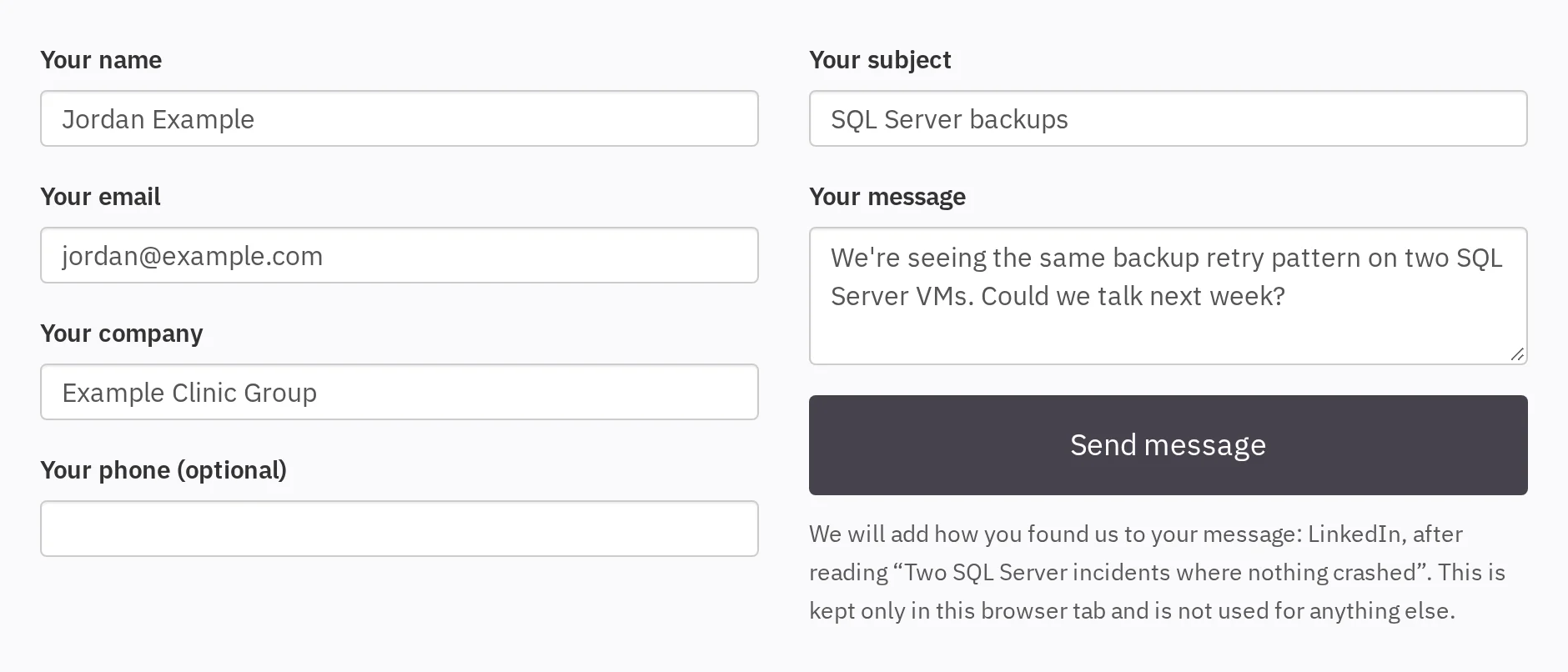 The form tells the visitor what it will add, before they send.
Count leads in the CRM, not in the analytics
The obvious way to count leads per article is to send a telemetry event when the form is sent and count those events. Ad blockers and privacy browsers often block telemetry, so that undercounts by an unknown amount. It undercounts exactly the technical readers we write for.
So lead counts come from the CRM itself. The nightly job reads each lead’s “How they found us” block and attributes the lead to its first page and to the articles it read. Telemetry still supplies views, finished reads and shares, which are fine as approximate numbers. Leads are too few to approximate, so they come from the source of truth.
The nightly job
A GitHub Actions workflow runs every night at 06:15 UTC. It:
- reads 30 days of views, read depth, shares and traffic sources from Log Analytics;
- reads the website leads from Omnisnia and parses their attribution blocks;
- upserts one record per article in an Omnisnia custom object, “Blog post”. Each record has 7-day and 30-day views, finished reads, finish rate, shares, top source, and leads from readers for 30 days and all time;
- on Mondays, writes a digest to the CRM’s documents. It lists the week’s top articles, where readers came from, the leads who read an article first, and blog searches that found nothing. Those failed searches are our best list of topics to write about.
A setup script creates the custom object and adds lead-score rules by Source: 15 points for a lead from a shared article, 10 for search or an AI assistant. It’s idempotent, so running it again changes nothing.
The job’s identity is narrow. GitHub signs in to Azure with OIDC, so there’s no Azure secret stored in GitHub. The app registration has two roles: Log Analytics Reader on the one workspace, and Key Vault Secrets User on the one secret that holds the CRM API key. That role is scoped to the secret, not the vault, because the same vault holds other keys.
Three things went wrong on the way:
- Cloudflare blocked the job. The CRM sits behind Cloudflare. It answered Python’s default
urllibuser agent with error 1010, which blocks a client by its browser signature. A descriptiveUser-Agentheader fixed it. - A one-second query stalled. The first run with the real key failed when a Log Analytics query that usually takes one to two seconds hit the 60-second read timeout. The rerun passed. The job now retries once, after 10 seconds, on a timeout or a dropped connection. It still fails at once on an HTTP error, which a retry won’t fix.
- An automation had never fired. A CRM rule meant to draft a reply with a booking link matched leads whose Source was exactly
web-form. Website leads had always carried a suffix afterweb-form, so the rule had never matched one. The fix is a condition of “containsweb-form:contact”. If a rule matches on a field value, test it with a real record.
What this can’t tell you
Keeping attribution in one tab keeps it private, but it limits what we can see:
- Return visits look direct. Someone who reads an article from LinkedIn on Monday and comes back on Thursday to send the form shows up as a direct visit. Nothing links the two visits, by design.
- A new tab starts fresh.
sessionStoragestarts empty in a new tab, so a reader who opens the contact page in a new tab arrives with no attribution. - Phone calls and email carry none of it. Only the web form adds the block.
- The counts are small. A small consultancy gets a handful of website leads a month. The per-article lead counts show which writing starts conversations. They won’t prove one headline beats another.
We accepted those limits. The alternative was a cookie and a consent banner, to learn a little more about very few people.
Checklist
- Tag every share link with the channel and the post, and remove the tags from the address bar once they’re recorded.
- Keep first touch and articles read in
sessionStorageif you don’t want cookies, and be clear about what that misses. - Put the attribution into the lead itself, where whoever follows up will see it, and show the visitor what you’ll add.
- Count leads from the CRM, not from browser telemetry.
- Give scheduled jobs OIDC sign-in and the narrowest roles, down to a single secret.
- Set a real
User-Agenton API calls from scripts, and retry timeouts once, but not HTTP errors. - Test every automation that matches on a field value with a real record.
How we can help
We connect websites, apps and AI receptionists to CRMs and cloud monitoring, and we keep the data honest and the access narrow. See our services to find out how we can help.