Our own site sent no security headers at all. No HSTS, no Content Security Policy, no frame protection. A static site has no login and no database, so it’s easy to call that harmless. But a prospect who checks a cloud security firm’s site with a header scanner sees a failing grade, and a site with no CSP will run any script that gets into its pages. We fixed it in one day: an enforced CSP with zero refusals, and HSTS on a ramp. Most of the work was removing things, not writing the policy.
Update, October 20, 2026: our site has since moved from Azure Front Door to Cloudflare; the lessons here still apply to Front Door.
The site is built with Hugo and served from an Azure Storage static website, with Azure Front Door Standard in front of it.
Why the headers have to come from the edge
An Azure Storage static website can’t add custom response headers. So the headers have to come from whatever sits in front of it. For us that’s Front Door. Its rule sets can set headers on every response.
A <meta http-equiv="Content-Security-Policy"> tag in the page isn’t a full substitute. The CSP specification ignores frame-ancestors in a meta tag, and there is no report-only form of the meta tag. Both mattered here, as you’ll see below.
These are the headers we set:
| Header | Value | What it does |
|---|---|---|
Strict-Transport-Security | max-age=300, raised in steps | Browsers use HTTPS only for this host |
Content-Security-Policy | The policy below | Limits where scripts, styles, frames and connections can come from |
X-Content-Type-Options | nosniff | Stops browsers guessing a file’s type |
Referrer-Policy | strict-origin-when-cross-origin | Other sites see our origin, not the full URL |
Permissions-Policy | camera=(), microphone=(), geolocation=(), payment=(), usb=() | Pages can’t ask for these features |
X-Frame-Options | DENY | No other site can frame ours, for older browsers |
Make the policy small before you write it
A CSP lists every origin a page may load from. Each third party is another origin in the list, another thing that can break when you enforce it, and another party whose code runs on your page. So we started by removing them.
- A membership badge widget. A script tag loaded it in the footer of every page, without
asyncordefer. It also set a cookie, which contradicted our own cookie-free analytics. We replaced it with a plain text link to the same directory listing. - Hosted web fonts. The font stylesheet was a render-blocking request to one origin, and the fonts came from another. We now serve Latin subsets of our fonts from our own origin.
- The map embed. The contact page loaded a map iframe for every visitor. It was the slowest page on the site, with a mobile Largest Contentful Paint of 4.0 seconds. Now the page shows the address and a “Show map” button that creates the same iframe. It also has a plain link that opens the map with no JavaScript.
- jQuery and Bootstrap’s JavaScript. These were self-hosted, so they didn’t add origins. But a mobile menu was their only job, and about 30 lines of plain JavaScript do the same.
The analytics SDK was already served from our own origin. After the removals, the policy needed only three outside destinations: the CRM endpoint the contact form posts to, the analytics ingestion endpoints, and the map iframe.
default-src 'self';
script-src 'self' 'unsafe-inline';
style-src 'self' 'unsafe-inline';
font-src 'self';
img-src 'self' data:;
connect-src 'self' https://<crm-api> https://*.in.applicationinsights.azure.com
            https://*.livediagnostics.monitor.azure.com https://js.monitor.azure.com;
frame-src https://www.google.com;
object-src 'none';
base-uri 'self';
form-action 'self';
frame-ancestors 'none'
That was the policy on October 10, 2026. Since then we’ve added one more connect-src host, for the backend of a website chat. We added it to the policy before switching the chat on, so the feature never ran into a refusal. A new feature that makes requests means a policy change, and the policy change goes first.
The two 'unsafe-inline' sources are a known gap. We cover them at the end.
Report-only first, with one directive enforced
We shipped the policy in two headers at once:
Content-Security-Policy: frame-ancestors 'none', enforced from day one. Nobody frames our site, so it couldn’t break anything.Content-Security-Policy-Report-Only:with the full policy. The browser reports what the policy would block, and blocks nothing.
A browser applies every CSP header it receives, so the two work side by side. This let us turn clickjacking protection on at once, while the rest of the policy proved itself.
Our policy has no report-to endpoint, so violations appear only in the browser console. For a small static site, we decided a deliberate check was enough. We loaded every page type with the console open and used each feature that makes a request:
- the home page, where analytics loads its configuration and then sends data;
- a blog post, with its share bar, copy button, read-depth tracking and image zoom;
- the blog index, with search and topic filters;
- the contact page, where we opened the map and sent the form, with the CRM call intercepted.
Nine pages showed no violations and no console errors. Then we switched the full policy to Content-Security-Policy and checked again, more widely. Across 13 pages there were still zero refusals.
A larger site, or one with user content, should collect reports from real visitors before enforcing. A manual crawl only finds what you think to test.
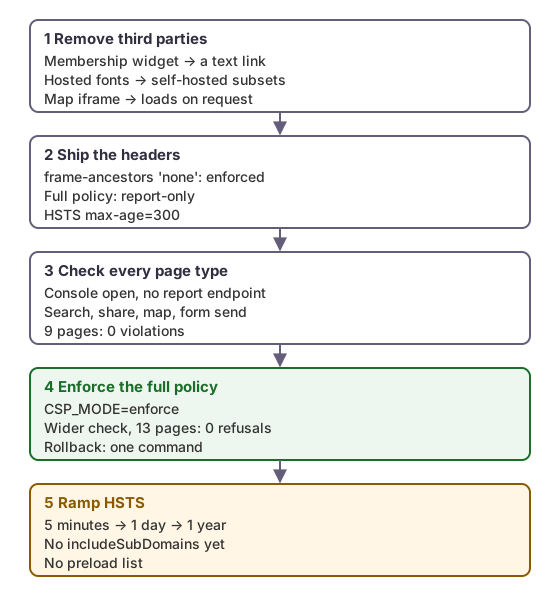 Each step could be rolled back on its own. Enforcement came only after a clean check of every page type.
The Front Door mechanics
Each header is a “Modify response header” action, with the Overwrite operator, in the rule set attached to the site’s route. Three details shaped how we built the rules.
A rule holds at most five actions. Six headers (seven while the CSP was report-only) don’t fit in one rule, so they’re split across two. securityHeaders sets five of them. securityHeadersCsp sets the CSP: either the full policy, enforced, or the report-only pair described above.
Rules that redirect stop the rule set. Our www-to-apex, retired-URL and HTTP-to-HTTPS redirects come first in the rule set and stop processing when they match. So their responses don’t carry the security headers. That mostly doesn’t matter: browsers ignore HSTS sent over plain HTTP, and every redirect lands on the HTTPS apex, which sends the headers. The one real gap is https://www.<site>/. Its 308 redirect carries no HSTS, so browsers never record HSTS for the www host. Adding the header to that redirect rule, or includeSubDomains later, should close it. We haven’t tested the first option yet.
Changes take minutes to reach every edge. We saw one to ten minutes, as we did with our redirect rules. Verify with requests, not with the portal’s status fields:
curl -sI https://<site>/ | grep -iE 'strict-transport|content-security|x-frame|x-content-type|referrer-policy|permissions-policy'
We wrote the changes as a script that a person runs one section at a time, not as a pipeline step. By default it’s a dry run that prints the az afd rule commands. With --apply, it first refuses to run if a rule name or order it would use belongs to another rule. Then it deletes and recreates only its own rules. The same command with CSP_MODE=enforce or CSP_MODE=report switches the policy, so rolling back is one line.
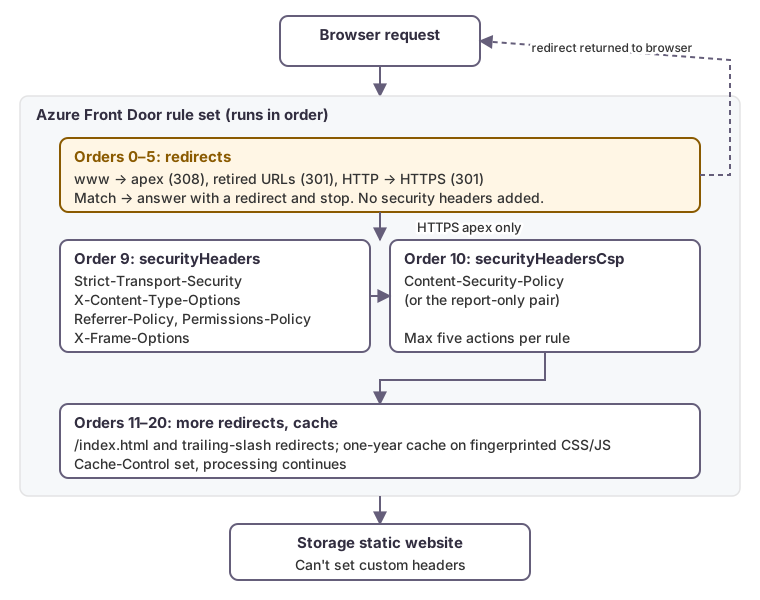 Redirect rules stop the rule set, so only responses from the HTTPS apex carry the headers.
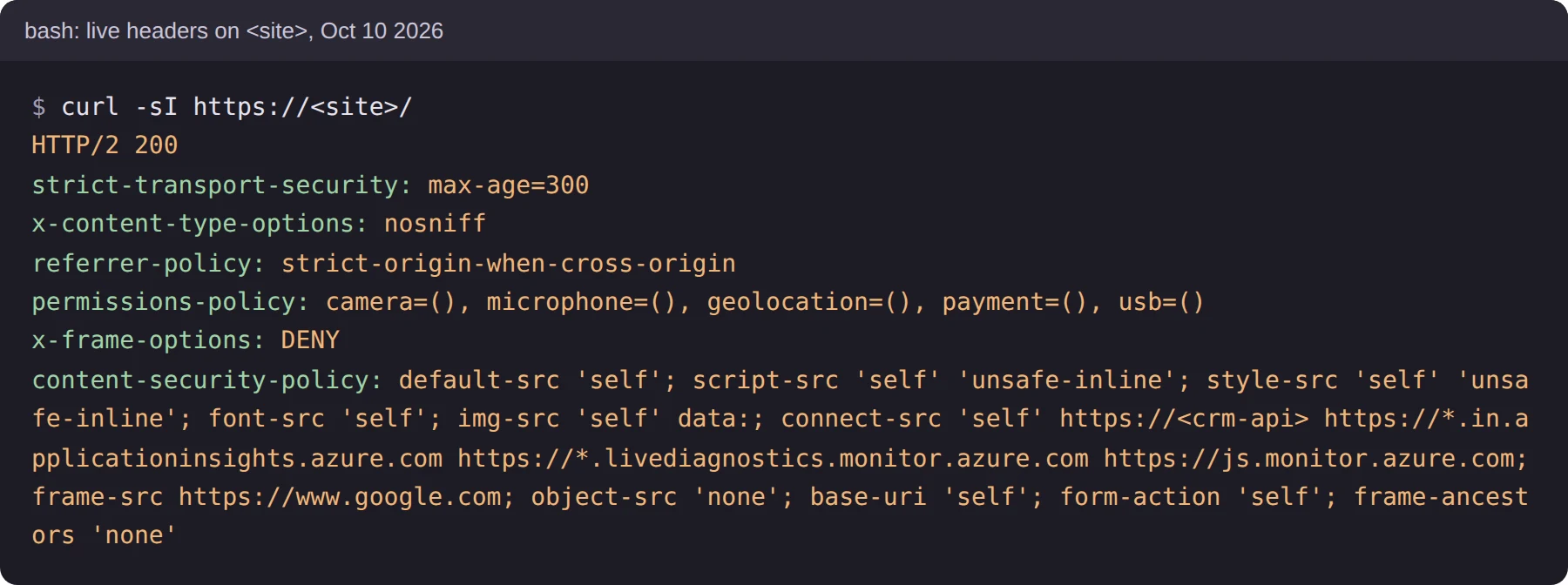 The live headers after enforcement on October 10, 2026, with the domain shown as
 <site> and the CRM host as <crm-api>.
HSTS: start at five minutes
HSTS tells a browser to refuse plain HTTP for a host for max-age seconds. If you get it wrong, there is no quick undo: every browser that saw the header keeps it until the max-age runs out. So we started at max-age=300, which fixes itself in five minutes. After a clean day we raise it to 86400 (one day), and after a clean week to 31536000 (one year).
We left out includeSubDomains. When we checked our DNS zone, four subdomains didn’t answer HTTPS. With includeSubDomains, a browser that had visited the apex would refuse to load them for a year. We’ll add it once every subdomain serves HTTPS or is deleted. We also aren’t submitting the domain to the HSTS preload list, because getting removed from it takes months.
What changed
- Lighthouse best practices was 77 on every page before. After the release it was 100 on the home and contact pages we re-tested. The widget’s cookie and a deprecated
unloadlistener in the analytics setup were what had cost the points. - Home and contact now score 100 for accessibility, best practices and SEO, and 95 or more for mobile performance.
- On load, the site contacts only the analytics endpoints. The map loads only when someone asks for it.
- The enforced policy has blocked nothing that the site uses.
What’s left: 'unsafe-inline'
Our policy still allows inline script. That means it stops a script loaded from another origin, but it would not stop a script injected inline into a page. That is the most common form of cross-site scripting. So the CSP limits the damage less than it could.
Five inline scripts remain: the analytics configuration, the contact form handler, the map loader, and two one-line scripts on the blog index. A static site can’t use CSP nonces, because a nonce has to be new on every response, and neither the storage origin nor a Front Door rule can generate one. That leaves two options: hash each inline script into the policy, or move them into files. Moving them is simpler and survives edits, so that’s our next step. style-src 'unsafe-inline' covers style attributes in the templates. It is a smaller risk, and it comes after.
Update, October 16, 2026: done. All five scripts are now files served from our own origin. Their configuration moved into JSON data blocks (
<script type="application/json">), which browsers never execute, and a build check fails if an inline script or event handler comes back. That letsscript-srcdrop'unsafe-inline'. The stricter policy goes live with our next change at the edge.
Checklist
- Serve security headers from the CDN or edge. A static storage origin can’t set them, and a meta tag can’t carry
frame-ancestorsor report-only. - Remove third-party scripts, fonts and embeds before writing the policy. Every origin you drop is one fewer to allow.
- Enforce
frame-ancestors 'none'at once, and run the full policy report-only beside it. - Check every page type and every feature that makes a request, with the console open, before enforcing. Collect reports instead if you can’t test everything yourself.
- Add a feature’s origins to the policy before you switch the feature on.
- Remember that redirect rules may skip your header rules. Check what headers each redirect response carries.
- Start HSTS at minutes. Add
includeSubDomainsonly when every subdomain serves HTTPS. - Treat
'unsafe-inline'inscript-srcas a known gap with a plan, not as done.
How we can help
We review and fix security headers, edge configuration and cloud estates, and we check the result with live requests rather than by reading configuration. See our Cloud Security & Compliance services to find out how we can help.