A closed beta has a clerical problem. Somebody has to read each request, decide, add the person in App Store Connect, write back to say they’re in, and remember who asked for Android. Done by hand, the decision takes seconds and the paperwork takes the rest of the week. On October 24, 2026, Nandeshou opened requests for the Omnisnia CRM iPhone app’s closed beta with that paperwork automated. A person still makes the decision, and it is the only manual step.
This post walks through the flow, the guards that make the automation safe to run every 15 minutes, the pipeline that gets each new build in front of external testers in the first place, and the four things that broke on launch day.
The flow
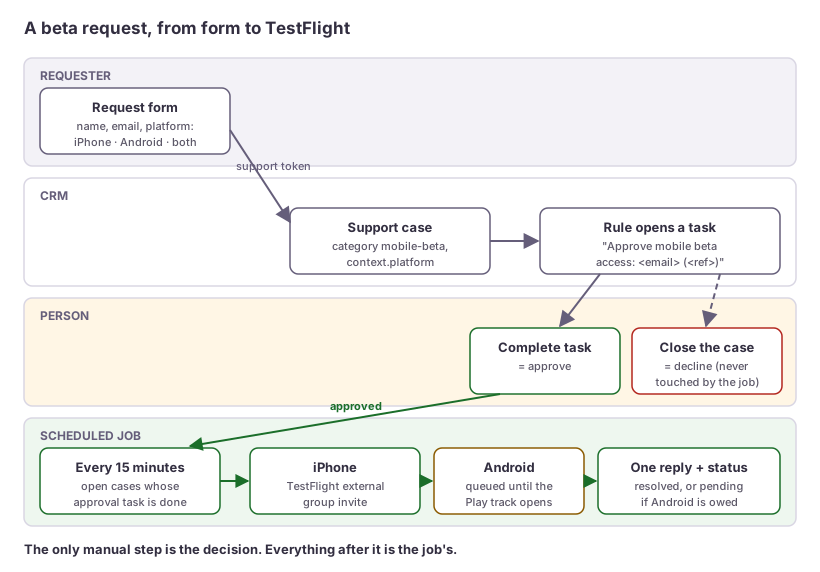
- The request. The beta page explains what the beta is and who it’s for, and has a short form: name, email and platform (iPhone, Android or both). The form posts to Omnisnia’s public helpdesk intake using a support token, the same mechanism any app uses to file a ticket. The token is bound to the category
mobile-beta, and the platform travels in the case’scontextas exactlyios,androidorboth. - The case. The request becomes an ordinary support case on Nandeshou’s own support desk, next to every other customer conversation. Nobody has to watch a separate inbox or spreadsheet.
- The approval task. A CRM workflow rule opens a task on each new beta case: “Approve mobile beta access”, with the requester’s address and the case reference.
- The decision. A person reads the request. Completing the task is the approval. Closing the case without completing it is a decline. There’s no admin screen to build and no new permission to grant: the team already knows how to complete a task and close a case, and both leave an audit trail.
- The execution. A scheduled GitHub Actions job runs every 15 minutes. It finds open beta cases whose approval task is done, invites iPhone requesters to the production app’s external TestFlight group through the App Store Connect API, and posts one reply on the case. The reply tells the requester what to install and how to sign in.
Android isn’t on Google Play yet. An Android request is approved and queued: the reply says so plainly, and the case moves to pending rather than resolved. The Android step sits behind a small interface. Today’s implementation makes no network call and answers “queued”. When the Play closed track opens, an implementation that adds the address to the track’s Google Group replaces it, and Android cases resolve like iPhone ones.
Safe to run every 15 minutes
A job that sends real invitations and real customer email on a timer has to be safe to run twice, to run while somebody is changing the case, and to fail on one case without hurting the rest. Each of these guards exists because the simple version fails in a specific way.
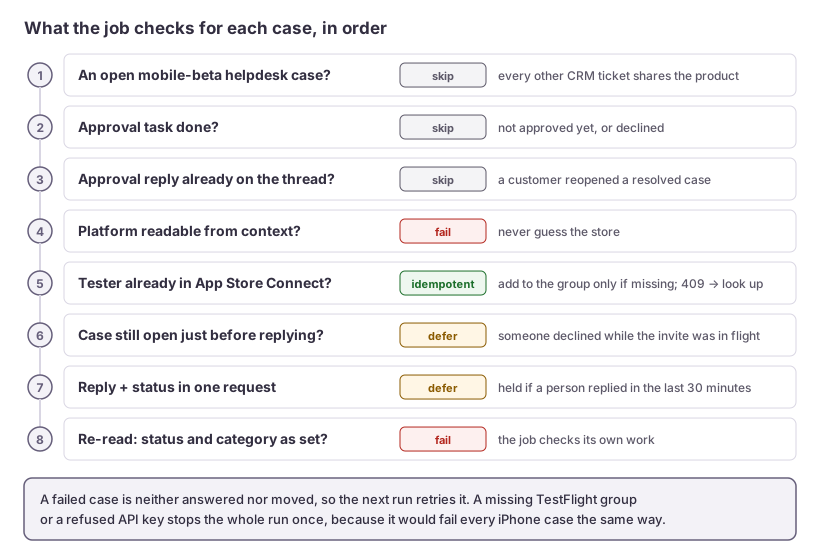
- The case status is the “processed” marker. Only
opencases are candidates. The reply and the status change go in one request (POST /case/:id/replywith astatus), written in one transaction, so a case can’t end up answered but stillopen. - Status alone isn’t enough. If a customer replies to a resolved case, the helpdesk reopens it, and its approval task is still done. So the job reads the thread first. A public agent message starting with the approval sentence means “already approved and answered”. The job skips the case and leaves the customer’s new message for a person. That sentence is a marker: changing it would make every case answered under the old wording eligible for a second reply.
- Apple’s side is idempotent on its own. The job looks the tester up by email before creating one, adds an existing tester to the group only if they’re missing, and treats a
409on create (a tester created since the lookup) as “look them up again”. - A decline can arrive mid-run. Just before replying, the job re-reads the case. If someone has closed it while the invite was in flight, the invite is harmless; the reply wouldn’t be. The case is deferred with a warning.
- It doesn’t talk over a person. The helpdesk refuses a second agent reply to the same requester within 30 minutes. The job treats that as “try next run”, not as an error.
- It checks its own work. After replying, the job re-reads the case and fails loudly unless the status and category are what it set.
- One bad case doesn’t stop the run. Each case is isolated, and a failed case is neither answered nor moved, so the next run retries it. One catch: the App Store Connect helper signals errors with Python’s
SystemExit, whichexcept Exceptiondoes not catch. The handler names it explicitly. - Some failures should stop everything. A missing TestFlight group, or Apple refusing the API key, would fail every iPhone case the same way. That check runs once, outside the per-case isolation, and stops the run.
- Only one run at a time. A GitHub Actions concurrency group makes overlapping runs impossible, not just unlikely.
- No guessing. If a case’s platform can’t be read, the case fails rather than defaulting to iPhone. Inviting to the wrong store, or saying “approved” with nothing behind it, is worse than a red run.
Privacy in the logs
Actions logs are readable by everyone with access to the repository, so the job never prints a full email address or a requester’s name. Cases appear by ID and public reference, and addresses are masked to j***@example.com. Error bodies get the same scrub, because App Store Connect echoes the address back when it refuses one. The website’s privacy policy now says that an approved iPhone requester’s name and email are shared with Apple to send the TestFlight invitation.
The other half: getting each build to external testers
An invitation is only useful if the group has a build to install. Until this week, the distribution workflow added new builds to internal TestFlight groups only. Nothing submitted a build for Beta App Review, so the external group had no installable build until one was submitted by hand. It was approved within minutes.
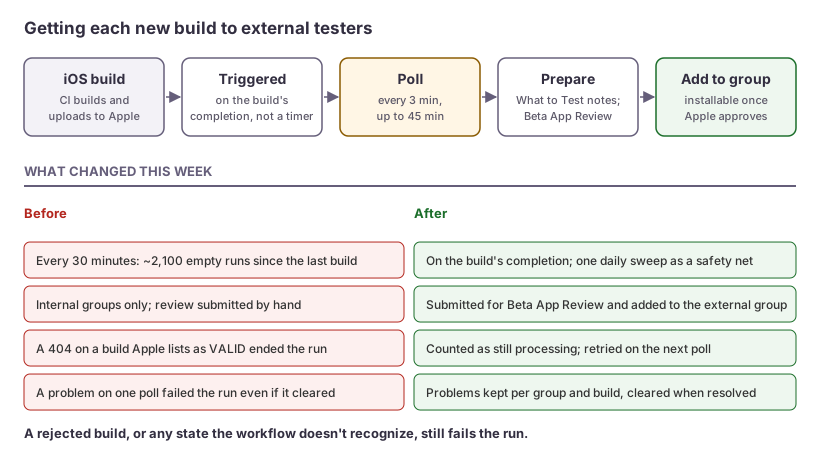
The distribution workflow now handles external testers on its own:
- It runs when a build finishes, not on a timer. It used to run every 30 minutes. That was about 2,100 runs since the previous iOS build, and every one found nothing. Now the iOS build workflow’s successful completion triggers it, and it polls every 3 minutes for up to 45 to cover Apple’s processing time. A daily sweep makes one extra pass as a safety net.
- It submits for Beta App Review. For the production app’s external group, a new build gets “What to Test” notes if it has none, is submitted for review if it hasn’t been, and is added to the group. It becomes installable once Apple approves it. A rejected build fails the run, and so does any state the workflow doesn’t recognize.
- It tolerates Apple’s two clocks. One build was listed as
VALIDby/v1/builds, yet adding that same ID to a group returned404“There is no resource of type ‘builds’”. A re-run minutes later succeeded. Apple’s build catalog and its beta-group API catch up at different speeds, so a404on the group add now counts as “still processing” and is retried on the next poll. Any other refusal still stops the run. - A passing problem doesn’t fail the run. Problems are recorded per group and build. One that clears on a later poll, such as a build that wasn’t ready to submit yet, is removed, rather than failing a run that ended up succeeding.
The decisions are replayed in CI against a fake App Store Connect, so a change to the rules is tested before it touches a real build.
What broke on launch day
Four things, all fixed the same day, and all quiet:
- A token that was skipped at boot. The intake token was first declared for its own product,
omni-crm-mobile-beta. Nandeshou’s support desk accepts only a fixed list of product IDs, so the declared token was silently skipped at startup and production refused it. The fix was to drop the separate product: the form now files under the existing CRM product with a token bound to themobile-betacategory. The job matches on the category and skips every ordinary CRM ticket, and a test pins that. - The API hid the one field the job needed. The requested platform lived in the case’s
context, which only the cross-tenant operator console could read. The case API now returnscontextread-only, and refuses it on create, the same treatmentproductgets. The job’s error for a case with no context names both possible causes: a server that predates the change, or a request filed without one. - The reply named the wrong product and promised the wrong device. The draft said “Omni CRM” and mentioned iPad. The app, the website and the form all say Omnisnia CRM, and nobody had tested iPad. It was corrected before a single reply went out. Because the opening sentence is the “already answered” marker, it had to be fixed before the first send, not after.
- A schedule that would have failed 96 times a day. Until the CRM API key was in place, every 15-minute run would have failed with the same message. A scheduled run without its secrets now warns and passes; a manually started run still fails, because someone asked for it to do something.
There was also one familiar trap: Cloudflare answers Python’s default urllib user agent with a 403 (error 1010), which reads exactly like a bad API key. The job sends its own, specific user agent.
The first request through the live form went end to end on launch day: approved by completing the task, invited to TestFlight, answered and resolved. Since then the schedule has run every 15 minutes, and a run with nothing approved costs two or three API calls.
If you run a closed beta
- Put requests where your team already works. A case in the CRM beats a form-to-email inbox or a spreadsheet: it has an owner, a history and a reply channel.
- Make the approval a step people already know how to take. Completing a task and closing a case need no new UI, no new role and no training.
- Automate everything after the decision. The invite, the reply and the status change are clerical, so they shouldn’t wait on a person.
- Use a state you can see as the “done” marker, then check what can reopen it. Here, a customer reply could. Store the marker somewhere a re-run will read.
- Keep testers’ details out of your CI logs.
- Automate Beta App Review submission too. Otherwise your new external testers join a group with nothing to install.
If you want a similar pipeline for your own app’s beta, or a review of the one you have, talk to us.