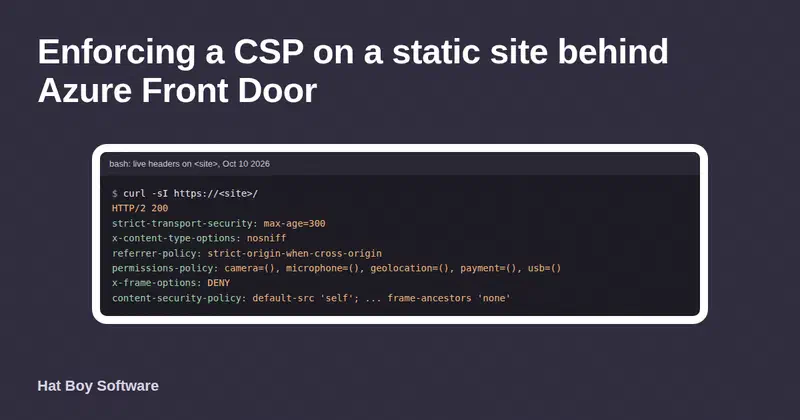
Redirects decide whether search engines carry a page’s history to its new address or treat the move as temporary. Azure Front Door Standard can handle all of them at the edge, but several defaults and validation rules work against you, and some fail without an error. These are the ones we hit while moving our own site’s redirects and cache headers into Front Door rules, checked against Microsoft’s documentation.
Update, October 20, 2026: our site has since moved from Azure Front Door to Cloudflare; the lessons here still apply to Front Door.
Why the status code matters
Google treats 301 and 308 as permanent: the redirect target becomes the canonical URL. It treats 302 and 307 as temporary: it follows them, but doesn’t use them as a signal that the target should be canonical. For a domain consolidation (http to https, www to apex) or a retired page, you want permanent.
You also want one hop. Google can follow a chain of up to 10 redirects but advises redirecting straight to the final destination. Chains also slow visitors down, and every extra hop is another place for a rule to go wrong.
The route’s HTTPS redirect is temporary
A Front Door route has a built-in “Redirect all traffic to use HTTPS” switch. In our testing it answered with a 307 Temporary Redirect. Microsoft’s own redirect guidance says to use 301 for HTTP to HTTPS, and a rule set’s URL redirect action offers all four codes: Found (302), Moved (301), Temporary Redirect (307) and Permanent Redirect (308).
So we turned the route’s switch off and wrote the redirects as rules:
| Order | Rule | Effect |
|---|---|---|
| 0 | www to apex | Any scheme, to https:// on the apex domain, 308 |
| 2 | Retired work page | To its replacement section, 301 |
| 3–4 | Retired blog posts, tags and categories | To the blog index, 301 |
| 5 | HTTP to HTTPS | Same host and path, 301 |
| 6–8 | Cache headers | See below |
Order matters. Rules run in the order they appear. The retired-URL rules each redirect straight to the https:// apex, and the general HTTP-to-HTTPS rule sits after them. That way, an old http:// link reaches its new home in one hop rather than first being upgraded to HTTPS and then redirected again. Check the hop count with curl rather than reasoning about it. On October 9, 2026, http://<site>/work/ answered with a single 301 straight to https://<site>/case-studies/.
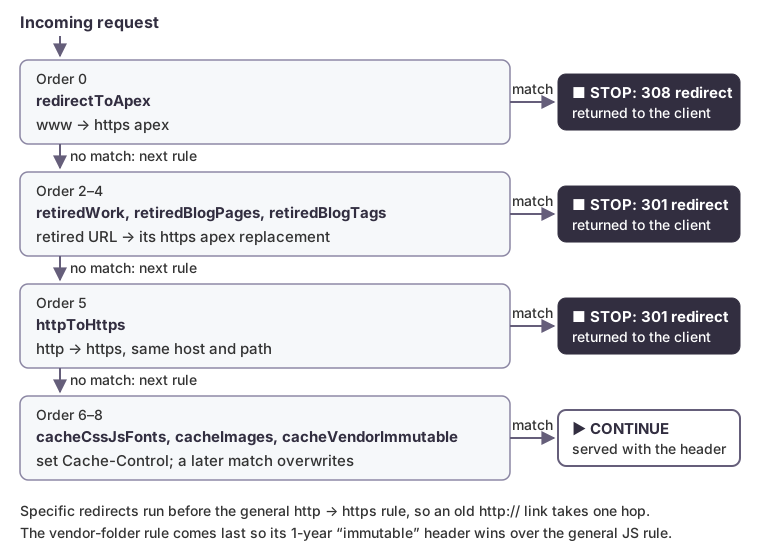 Redirect rules end processing when they match; the cache-header rules only modify the response.
A redirect action looks like this in the rule set’s JSON:
{
  "name": "UrlRedirect",
  "parameters": {
    "typeName": "DeliveryRuleUrlRedirectActionParameters",
    "redirectType": "Moved",
    "destinationProtocol": "Https",
    "customHostname": "<apex-domain>",
    "customPath": "/case-studies/"
  }
}
Path conditions: leave off the leading slash
The request path match condition compares against the path without its leading slash. The documentation says so: in https://www.contoso.com/files/secure/file1.pdf, the path is files/secure/file1.pdf. Write work/, not /work/.
{
  "name": "UrlPath",
  "parameters": {
    "typeName": "DeliveryRuleUrlPathMatchConditionParameters",
    "operator": "BeginsWith",
    "matchValues": ["work/"],
    "transforms": ["Lowercase"]
  }
}
This is where our testing differed from the documentation. The docs say a leading slash in the value “gets ignored”. In our setup, values written with a leading slash were accepted without complaint and then never matched, even after several minutes. The same values without the slash matched within about 20 seconds. The redirect just didn’t happen, and nothing reported an error. If a path rule seems inert, check the slash first.
At most 10 values per condition
A rule can have up to 10 match conditions, and the docs say so. In our testing, a single condition also accepted at most 10 match values. We didn’t find that limit in the published Front Door limits. With more than 10 retired URLs, split them across rules, as we did for retired posts and retired tag pages, and name the rules so the next person knows where to add one.
No generic trailing-slash redirect
Our pages live at URLs with a trailing slash, and we wanted /services to redirect to /services/. A redirect action’s custom path must start with /, which the docs state. The docs also list URL redirect among the actions that accept server variables, and they describe segment capture ({url_path:seg1}) and case transforms. But in our testing, a custom path built on the plain {url_path} variable wasn’t accepted, so we couldn’t write one rule that appends a slash to any path.
Every page declares its trailing-slash URL as canonical, and every internal link points to the canonical form, so search engines get a consistent signal. Segment capture might cover fixed-depth URLs, but we didn’t pursue it.
Update, October 11, 2026: we later added one rule per top-level page instead. Each rule matches one path exactly, such as services with the Equal operator, and answers with a 301 to the same path with a slash. Seven pages need seven rules, plus one that sends /index.html to /. The query string is kept: /services?x=1 goes to /services/?x=1. Two limits remain:
- Plain HTTP takes two hops.
http://<site>/servicesmeets the HTTP-to-HTTPS rule first, then the slash rule. There are too few free rule orders before it for eight rules, unless we renumber the existing ones. - Matching is case-sensitive here.
/Servicesisn’t redirected and returns a 404.
Changes take minutes, and the status field can mislead
In our testing, most rule changes reached every edge within a few minutes, but reordering the rules took more than 10 minutes to show up. During that window, different requests can get different answers depending on which edge serves them.
Each rule has a deploymentStatus field. We found it wasn’t a reliable signal that a change was live. What worked was testing the behavior itself, repeatedly, until it was consistent:
curl -sI "http://<your-domain>/work/" | grep -iE '^(HTTP|location)'
Write the expected status and Location down before you change anything, so you’re comparing against something.
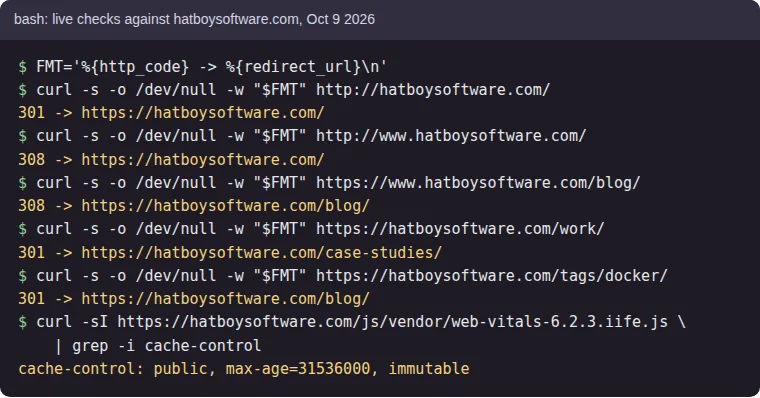 Live checks against our site after the rules settled, with the domain shown as
 <site>. Every redirect is one hop with a permanent code.
Cache headers in the same rule set
The same rule set sets Cache-Control with the modify response header action:
| Content | Cache-Control |
|---|---|
| CSS, JavaScript and fonts | public, max-age=86400 (1 day) |
| Images | public, max-age=2592000 (30 days) |
| Versioned third-party scripts | public, max-age=31536000, immutable (1 year) |
The “immutable” rule applies only to a folder where every file has its version in its name, so a new release is a new URL and nothing stale can be pinned in a browser for a year.
With the Overwrite operator, a header set by a later rule replaces one set by an earlier rule. The folder of versioned scripts also matches the general JavaScript rule, so its rule must come last. Put specific rules after general ones.
Retired URLs get real 301s
Hugo’s aliases front matter handles retired URLs by generating a small HTML page with an instant meta refresh and a canonical link. Google interprets an instant meta refresh as a permanent redirect, so this was never broken for Google. But it costs a page download before the redirect, and clients that don’t parse HTML, such as many link checkers and scripts, don’t follow it.
Front Door now answers those URLs with a 301 before the request reaches the origin. We kept the Hugo aliases as a fallback. When we retire a URL, it goes into both: the alias in the page’s front matter, and the path in a retired-URL rule.
Checklist
- Turn off the route’s HTTPS redirect if you need a permanent code, and replace it with a 301 rule.
- Order rules so specific redirects run before general ones and every legacy URL takes one hop.
- Write path values without a leading slash, and test that each rule matches.
- Plan for 10 values per condition.
- Verify changes with requests, not status fields, and allow more than 10 minutes for a reorder.
- Put specific cache-header rules after general ones.
How we can help
We configure and audit edge platforms like Azure Front Door for correctness, cost and search visibility, and we verify the result with live requests. If a migration or a domain change is coming up, see our services to find out how we can help.