Microsoft is retiring Azure Communication Services (ACS) as a standalone offering on September 30, 2028, and from October 23, 2026 it starts limiting onboarding to the retiring services. For anyone running a voice AI agent on ACS phone numbers and Call Automation, the near deadline matters more: new resources can’t get phone numbers, and “it talks to an AI model” doesn’t count as a supported integration. Existing numbers keep working, so the job now is to protect what you have and choose where new lines will run.
We run our own AI receptionist on ACS, and the announcement changed our plans for every new deployment. Below: what Microsoft’s retirement and breaking changes guide says (as of its October 8, 2026 update), what we chose, and a checklist.
What Microsoft announced
Microsoft announced the retirement on September 23, 2026. The guide splits ACS into two groups.
- Retired after September 30, 2028. These include phone numbers sold directly by ACS (Direct Offer), Direct Routing, SMS, Email and Chat.
- Breaking changes. These include Call Automation, audio streaming, call recording and the calling SDKs. They keep running after 2028, but are supported “only when used with a supported Teams-aligned service”, such as Teams Phone Extensibility. Standalone scenarios that don’t integrate with Teams, including application-to-human calls, lose support.
Until then, existing resources keep working. SDKs are in maintenance: break/fix, security and stability updates, but no new features.
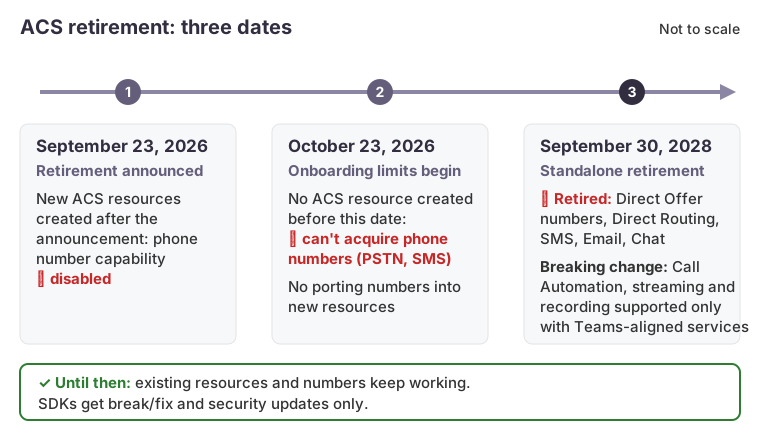
The three dates in Microsoft’s retirement guide, as of its October 8, 2026 update. Not to scale. The first two cards come from different sections of the guide, which don’t fully agree; see below.
The near-term restrictions
The guide isn’t consistent about when the phone-number restriction starts or whom it covers:
- The main notice ties it to October 23, 2026: customers without an ACS resource created before then “will not be able to acquire phone numbers for retiring telephony workloads, including PSTN calling and SMS.”
- The phone-number FAQ ties it to the announcement: on new resources created after September 23, number capability is “intentionally disabled”, and customers without existing ACS numbers “will no longer be able to acquire new phone numbers”.
- The SMS FAQ is the narrowest: only existing customers whose resources already hold numbers can acquire more.
These can’t all be true for a resource created between September 23 and October 23. Plan on the strictest reading: no resource created after the announcement gets numbers, and a resource with none yet may not get any. Check the portal for each resource, and recheck the guide, which has been revised since the announcement.
New customers with new ACS resources also can’t port numbers in. And deleting a resource before removing its numbers means “charges can continue on orphaned numbers”, which takes a support ticket to clear.
Why AI doesn’t make a workload eligible
A voice agent built on Azure AI services isn’t an integrated scenario. The guide is explicit: “Connecting to Cognitive Services or another AI service doesn’t, by itself, qualify a standalone ACS workload for support after September 30, 2028.” Eligibility depends on a supported Teams or Dynamics 365 scenario, not on the model behind it.
The second trap is streaming direction. A voice agent needs bidirectional audio: the caller’s speech streams to the model, and the model’s speech streams back into the call. Teams Phone Extensibility documents audio streamed from the call to a WebSocket. On the reverse path the guide is careful: “Support for sending audio out of a call doesn’t, by itself, establish support for sending audio back into that call.” It also says no Microsoft or Marketplace partner currently offers a standalone replacement for ACS audio streaming.
The options we weighed
Our receptionist bridges the phone call to the Azure Voice Live API, a realtime speech-to-speech service, and adds tools that record leads, recognize clients and transfer calls. We wanted to change how the call arrives and nothing else. The comparison below reflects Microsoft and carrier documentation as of October 2026.
| Criterion | Carrier adapter (chosen) | SIP to Azure OpenAI Realtime | Teams Phone Extensibility |
|---|---|---|---|
| How it works | Carrier streams call audio over a WebSocket into our existing Voice Live pipeline | A carrier SIP trunk routes calls straight into a realtime model session | ACS Call Automation linked to a Teams Phone resource account |
| Keeps our agent code | Yes | Partly; orchestration moves from Voice Live to the Realtime API | Yes, if two-way streaming works |
| Client prerequisites | An Azure tenant | An Azure tenant | Microsoft 365, Teams Phone licensing and a calling plan or operator, per client |
| Main open question | Carrier reliability and latency on our workload | SIP limited to East US 2 and Sweden Central today | Sending audio back into the call isn’t documented |
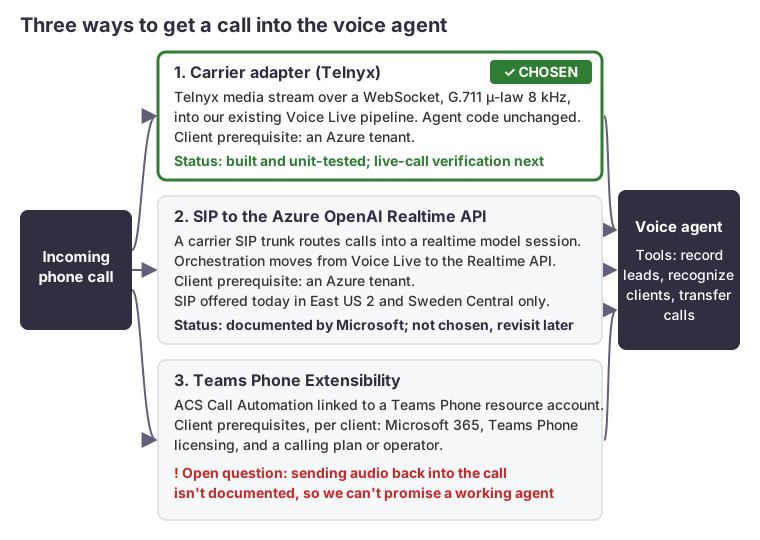
SIP to Azure OpenAI Realtime is documented in Microsoft Learn’s Realtime API via SIP guide: a SIP trunk routes to an Azure OpenAI resource, a webhook accepts the call, and a SIP REFER transfers it. It is the simplest call path, but it means rewriting our orchestration, and the guide lists only two SIP regions as of its September 2026 update. We’ll revisit it.
Teams Phone Extensibility is Microsoft’s supported path and suits organizations already on Teams Phone. For a small business, per-client Teams Phone licensing and calling plans are a heavy prerequisite, and until Microsoft documents sending audio back into the call, we can’t promise a working voice agent on it.
What we chose, and where it stands
We chose a carrier adapter on Telnyx. Telnyx’s media streaming documents bidirectional audio over a WebSocket and a clear message that stops queued playback, which is what barge-in needs. In the adapter’s design, calls arrive through a signed webhook, and the backend answers with a stream URL. It then runs the same agent, tools, caller recognition and hang-up fallback lead as the ACS path. Both providers are configured side by side in one deployment.
Audio is G.711 µ-law at 8 kHz both ways, converted to and from the 24 kHz audio the voice session uses. Telnyx also offers 16 kHz L16, but its byte order isn’t documented, so we left it out for now.
The adapter is built and unit-tested. Live-call verification is next, and we don’t treat it as proven until it passes. Still to confirm on real calls: audio quality, barge-in, and what happens to the media stream when a transfer bridges. The carrier docs don’t say whether the stream stops on its own, so the code handles both cases. Call recording isn’t implemented on this path yet. The carrier also becomes a processor of call audio, which each client’s data-flow documentation must name.
Our own line stays on ACS, where it is supported until September 30, 2028. We added a deletion guard to the resource in infrastructure code. Our plan is to port the number out through a support ticket only after the adapter has a clean record on live client calls. For how the agent’s tools fail safely regardless of carrier, see fail-safe tools for voice AI agents.
A checklist if you run on ACS
- Confirm what you hold. Open each ACS resource’s phone numbers page and see whether “Get” is enabled. Record which resources hold numbers that existed before the announcement. Azure Advisor’s Service Retirement workbook lists affected resources.
- Protect those resources from deletion. Add a management lock, a
prevent_destroylifecycle rule in Terraform, or both. A deleted resource can’t be recreated with number capability, and deleting it before removing its numbers leaves orphaned charges. - Don’t create new ACS resources expecting numbers. That includes per-client deployment templates that create one per tenant. Don’t count on pre-provisioning before October 23 either: under the FAQ’s reading, number capability is already disabled on resources created after the announcement.
- Inventory Call Automation and streaming use. Note which workloads send audio back into the call: that has the least support after 2028.
- Plan the port-out. Microsoft releases ACS numbers to another provider through a support ticket, and the receiving carrier runs the port.
How we can help
We build and operate AI phone receptionists that run in the client’s own cloud tenant. New lines will connect through a carrier once the adapter passes live-call verification. We also review existing ACS voice workloads against the retirement guide and plan the move. See our AI receptionist page for how it works.