Our site is static: Hugo pages served from storage, with no application server of its own. On October 10, 2026 we added an AI chat assistant to it. Conversations that include contact details become leads in our CRM. We didn’t build a new service for it: the chat runs on the backend that already answers our phone line, and shares that agent’s facts word for word.
One backend, one set of facts
Our AI phone receptionist’s backend already holds the company facts, the FAQ, the guardrails and the code that files leads in Omnisnia CRM, the same intake pipeline as our web form. A separate chat service would have meant a second copy that drifts. So the chat is two more routes on that backend: one for each message, and one the page calls when the visitor leaves.
The facts, FAQ and guardrails moved into one template that both prompts include. The risk was the phone agent, which was already live. Two tests cover it:
- A golden test renders the phone prompt and compares it, byte for byte, with a saved copy. Moving text into the shared template couldn’t change a character the phone agent sees without failing a test.
- A chat prompt test checks that the facts section from that saved phone prompt appears unchanged inside the chat prompt, and that the chat prompt never mentions the phone-only tools.
The chat gets two tools: one to file a lead and one to check office hours, with at most four tool rounds per visitor message. It can’t look up clients, open helpdesk cases or transfer calls. Each turn sends a system prompt of about 2,500 tokens, plus the conversation so far.
The widget
The widget is a Hugo partial and one small script, loaded with defer and a Subresource Integrity hash. Nothing calls the backend until the visitor sends a message; the first one goes with session_id: null, and the server returns a random session id.
There are no cookies. The session id and transcript live in the tab’s sessionStorage, so the conversation follows the visitor from page to page and is gone when the tab closes.
Two security rules come from the site, not the backend:
- Text nodes only. Replies and the visitor’s own text are rendered with
createTextNode. URLs become<a>elements built with the DOM API, and onlyhttp:andhttps:URLs are linked. Nothing goes throughinnerHTML. In testing,<img src=x onerror=alert(1)>rendered as text. The server also strips HTML tags and common Markdown from the model’s reply. - CSP first. The site’s Content Security Policy is enforced at the edge, and
connect-srclists every host a page may call. We added the backend host to the policy before switching the chat on. In the other order, the browser would have blocked every message and visitors would only have seen the fallback.
CORS: JSON sent as text/plain
The first version posted JSON with Content-Type: application/json. That makes a cross-origin fetch a non-simple request, so the browser sends a CORS preflight (OPTIONS) first and only sends the real request if the preflight succeeds.
A preflight costs a round trip before every message, and it makes the chat depend on the backend’s OPTIONS handling as well as its POST handling. We avoided it. Per MDN’s CORS guide, a request is “simple” and skips the preflight when the method is GET, HEAD or POST, the script sets only CORS-safelisted headers, and Content-Type is application/x-www-form-urlencoded, multipart/form-data or text/plain (there are a couple of further conditions about request bodies). The widget sends the same JSON text, labeled as plain text:
fetch(API + "message", {
  method: "POST",
  // A CORS "simple request": no preflight.
  headers: { "Content-Type": "text/plain;charset=UTF-8" },
  body: JSON.stringify(body),
  credentials: "omit",
  cache: "no-store",
  signal: ctrl.signal
});
The tradeoffs:
- The server must parse JSON whatever the Content-Type. Ours reads the raw body, caps it at 16 KB, and parses it as JSON. It already had to, because
navigator.sendBeaconsends a string body astext/plain. - The request reaches the server before anyone checks the origin. Without a preflight, any page can make a visitor’s browser send this POST, just as any HTML form can. So the chat routes check the
Originheader themselves: a request from an origin not on the allow-list gets a 403 before it reaches the model, and that covers the/endbeacon too. The chat uses no cookies or credentials, so a forged request can’t act as anyone. - The response still needs
Access-Control-Allow-Origin. The browser won’t let the script read the reply unless the response names the origin. Ours echoes the allowed origin and addsVary: Origin. - Origin checks only stop browsers. A script outside a browser can send any
Origin, or none. The limits below are what protect the backend from those.
In return, every message is one request, and there is no OPTIONS handler to get wrong.
Leaving the page isn’t leaving the chat
We wanted a lead even when a visitor gives an email address and then leaves before the assistant files anything. The obvious signal is pagehide, with a sendBeacon call to /end. But on a multi-page static site, pagehide fires on every click to another page and every reload, and the conversation carries on in the same tab afterwards. And a beacon sent as the tab closes may never arrive. So /end is only a hint:
/endrecords the time on the session and files nothing. A new message clears it.- A sweep files one fallback lead, with the transcript, when the session has been quiet for 600 seconds after the later of its last message and its last
/end, the visitor typed an email address or phone number, and no lead was filed. - The sweep doesn’t depend on
/endarriving: a quiet session with contact details is swept either way. - Claims in Redis make sure a fallback is never filed twice, or after a real lead, across replicas.
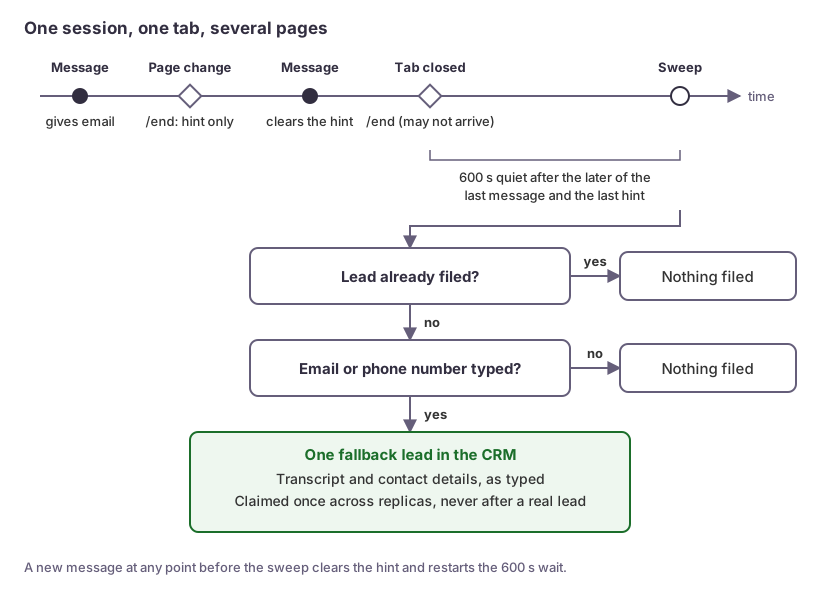 An end hint delays the fallback lead; it never files one.
No long-running worker is needed. The sweep runs at the start of chat requests, and chat traffic starts a small background loop that stops when no session is waiting. Known gap: after a restart with no chat traffic, a due fallback waits for the next chat request.
Limits instead of a CAPTCHA
A public endpoint that calls a model costs money per message. We decided against a CAPTCHA and against third-party scripts, so limits do the work:
| Limit | Value | What the visitor sees |
|---|---|---|
| Message length | 1,000 characters | The input stops there; the server rejects anything longer |
| Messages per conversation | 40 | The conversation ends and the contact options show |
| Messages per IP address | A short-window cap | “Try again in a few minutes” and the contact options |
| New conversations per IP address | An hourly cap | The same |
| Model tokens per UTC day | A fixed cap for the whole chat | “Chat isn’t available right now” and the contact options, until midnight UTC |
The per-IP limits need an address the client can’t fake. The first X-Forwarded-For entries are whatever the client sent; our ingress appends the address it accepted the connection from, so the backend uses the last entry. The address is hashed before it’s used as a counter key.
Two tabs can send on one session at once, so each session has a lock. A second message waits up to 30 seconds, then gets a 409 busy, and the widget gives the text back and asks the visitor to retry. Sessions expire 30 minutes after the last message; the widget starts a new one and resends once.
Every failure ends at a phone number
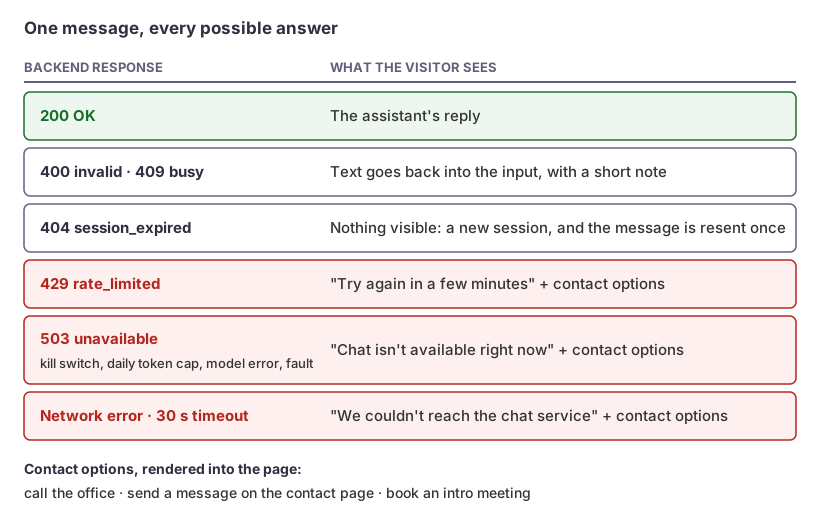 No outcome leaves the visitor without a way to reach us.
The panel has a fallback block rendered into the page: our phone number, the contact page and the booking page. It’s also what the kill switch shows. One setting on the backend makes every chat call return 503, and the next message shows the fallback. No site release is needed. A separate site setting removes the widget completely at the next build.
Handing off to people
Asked for a person, the assistant offers three options in one reply: book a 30-minute intro meeting, call the office, or leave a message. A message becomes a lead flagged as wanting a person.
Support requests become leads tagged as unverified, never helpdesk cases. In a chat box, anyone can type any company name, so the team decides what becomes a case.
Every lead goes to Omnisnia CRM with the source web-form:chat, a summary (the transcript, for a fallback lead), the page the visitor was on and how they found the site. Asked about price, the assistant says cost depends on scope and the team will talk it through. It never quotes a figure.
The first reply always says the visitor is talking to an AI and that what they type is shared with our team. If the model leaves that out, the server adds a fixed sentence.
Checklist
- Share prompt content through one template, and pin the existing agent’s rendered prompt with a golden test before you refactor.
- If you send
text/plainto skip a preflight, checkOriginon the server, send no credentials, and still returnAccess-Control-Allow-Origin. - Treat
pagehideand/endas hints. File fallback leads from server-side idle time. - Take the client IP from the hop your own ingress appends, not the first
X-Forwarded-Forentry. - Cap message length, messages per session, messages and sessions per IP, and tokens per day.
- Render model output with text nodes, and update
connect-srcfirst. - Give every error a human fallback, and put the kill switch on the backend.
How we can help
We build AI assistants that work inside your existing systems, with the limits, fallbacks and tests designed in from the start. See our Applied AI Engineering services to find out how we can help.